
How to Check an AI Rewrite Before You Send It

To check an AI rewrite before sending it, compare it with your original draft for meaning, numbers and dates, tone, added claims, and working links. A tool can fix the grammar while changing what you meant. Read its suggestion as a draft you still need to check, especially when the message includes a commitment.
Smooth writing is easy to trust. A changed condition or made-up source can slip past you while you're reading for style. A separate review gives you a chance to catch mistakes before sending something under your name.
The 5-point verification checklist for any AI rewrite
Use these five checks before copying a suggestion into an email, report, or publication. Keep your original draft open so you can compare the wording directly.
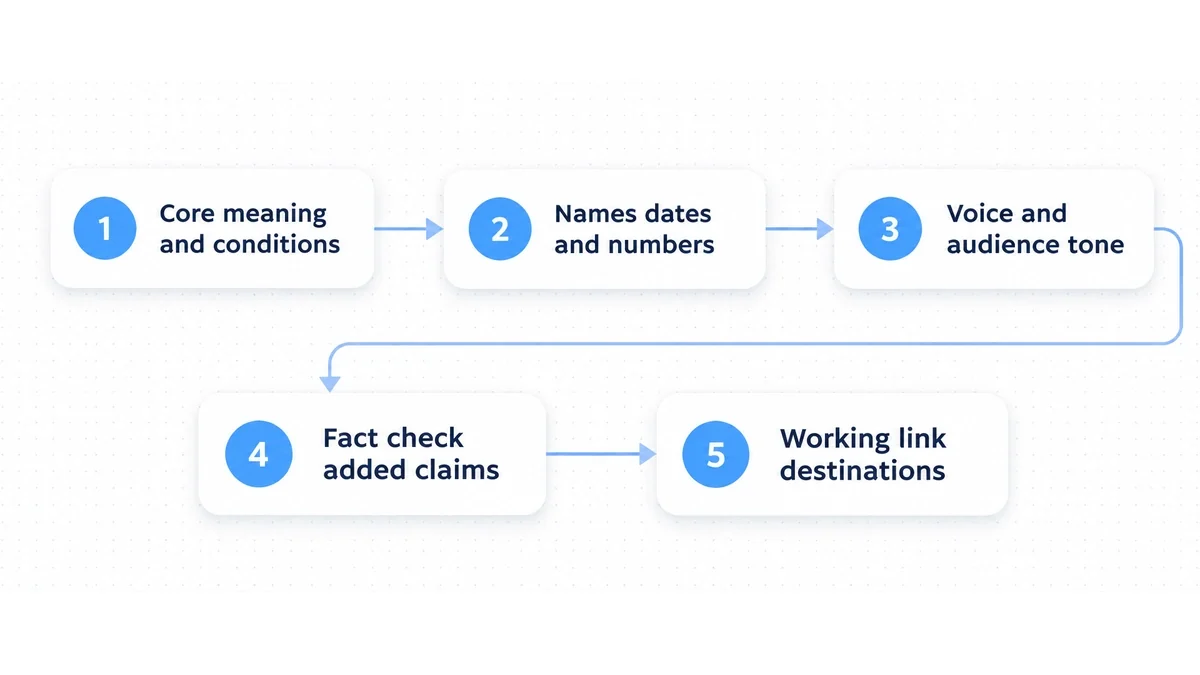
1. Verify that core meaning and conditions survived
Start with meaning. When a tool rearranges clauses to improve the flow, it can lose words such as "if," "unless," "tentatively," or "subject to approval." Those words may look easy to cut, but they explain when a statement applies. Without them, an estimate can become a promise or a suggestion can become a requirement.
Watch for missing negatives, too. Losing "not" or "unlikely" can reverse a sentence without making it sound wrong. Suppose you wrote "We cannot recommend this software without further security audits." Changing that to "We recommend this software following standard security audits" changes your judgment, even though the sentence is still grammatical.
The NIST Generative AI Profile defines confabulation as confidently presented erroneous or false content, including output that diverges from prompts or input, and notes that the use of generative AI systems may warrant additional human review. Put that review into practice by comparing each rewrite directly against your intended meaning to confirm that every condition and exception remains intact.
2. Verify names, dates, quantities, and numbers
A rewrite can transpose digits, change a unit, or round a figure that needs to stay exact. "12 to 14 business days" and "two weeks" may sound close enough on a quick read, but the second version doesn't account for weekends.
Check names as carefully as figures. A tool may replace an internal project codename with a generic industry term or substitute a different software release. If you wrote "PostgreSQL 15," keep that exact reference. "Postgres" loses the version, and switching to another database system changes the subject altogether.
The Habr analysis on detecting confident AI errors shows how models can invent percentages or change mathematical conclusions with confident wording. Give these details their own pass: look only at digits, dates, currency symbols, and proper names, and compare each with your source notes.
3. Evaluate tone and audience fit
Rephrasers often make work messages sound stiff or overly cheerful. Ask for a professional tone and you may get "synergize," "leverage," "paramount," or "delighted to announce." Ask for something casual and you may get exclamation marks and clichés that don't suit the recipient. Neither helps if it sounds unlike you.
The Digital.gov guidelines on plain language recommend clear, direct writing that puts the audience first and avoids bureaucratic language. Read the suggestion as if you were speaking to the recipient. Would you use those words in person? If the wording feels grand or awkward, cut the unnecessary adjectives and use a simple, active verb.
Be especially careful with workplace check-ins and sensitive negotiations, where a small change can make you sound demanding or unsure. Our guide on how to ask for a status update gives examples of keeping a request polite and direct.
4. Root out invented facts and phantom claims
A generative tool completes patterns; it doesn't check each statement against a record of what happened. During a rewrite, it may add a detail that sounds helpful but never appeared in your draft. That could be an imaginary case study or company policy, a nonexistent benchmark, or a claim that the whole team agreed when they didn't.
Google Search Central's guidance on creating helpful and reliable content asks publishers to avoid easily checked factual errors and provide useful information. Publishing made-up background details undermines readers' trust and goes against that guidance, however polished the paragraph sounds.
If a factual claim, historical statement, or technical capability wasn't in your prompt or primary research, remove it. Plausible wording isn't enough to justify keeping an added detail.
5. Test every URL, citation, and link destination
An AI-generated URL can look convincing because it starts with a real domain. The rest of the address may be made up. A link can also open successfully and still be wrong: the page might discuss a different topic from the sentence that cites it.
The Widoczni guide to verifying AI-generated copy describes ChatGPT links and statistics that lead to 404 errors or outdated information. Its advice is to use the output as a starting point and check each source yourself before relying on it.
Open every link before publishing. Check that the page loads without an error, comes from an authoritative source, and supports the sentence where you've cited it. A page that merely mentions the topic isn't enough. Find a primary source that supports the claim or remove the citation.
Checkpoints at a glance
Use this table when you need a quick reminder of what to look for and how to fix it.
| Verification area | Common warning signs | Recommended editorial action |
|---|---|---|
| Core meaning | Dropped "not", lost conditional clauses, missing caveats | Compare against original draft sentence by sentence; restore lost conditions. |
| Numbers and dates | Rounded percentages, altered calendar dates, swapped units | Perform an isolated scan of digits and proper nouns against source notes. |
| Voice and tone | Excessive adjectives, corporate jargon, hollow enthusiasm | Cut buzzwords; read aloud to ensure the text matches your normal speaking voice. |
| Factual claims | Unfamiliar case examples, invented policies, ungrounded claims | Cut any detail not explicitly supplied in your original research or prompt. |
| Links and citations | Nonexistent URL paths, 404 errors, irrelevant landing pages | Open every link in a browser tab to verify HTTP status and source relevance. |
Worked Before and After editing examples
The examples below show how to fix a specific problem without replacing the whole sentence. The first two include the original draft so you can see exactly where the AI suggestion changed a fact or commitment.
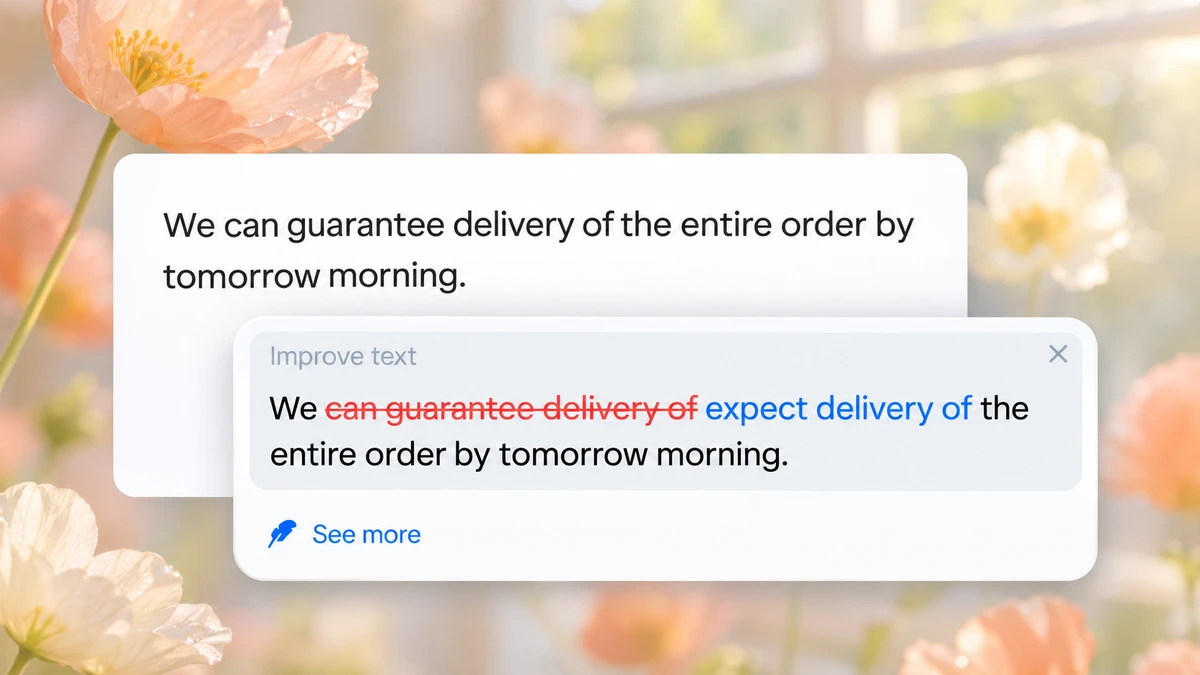
Example 1: Eliminating an invented guarantee
Original draft: We expect delivery of the entire order by tomorrow morning.
Before: We can guarantee delivery of the entire order by tomorrow morning.
After: We expect delivery of the entire order by tomorrow morning.
Why this edit works: The draft expressed an expectation, but the AI suggestion turned it into an unconditional guarantee. Replacing "can guarantee delivery of" with "expect delivery of" keeps the schedule and restores the intended level of certainty.
Example 2: Correcting a shifted number and restoring accuracy
Original draft: The migration reduced database latency across primary endpoints.
Before: The migration reduced database latency by 85 percent across all primary endpoints.
After: The migration reduced database latency across primary endpoints.
Why this edit works: The original draft reported a measurable reduction in latency without an exact figure. The tool added 85 percent to make the claim sound more authoritative. Removing that figure keeps the reported improvement without claiming a measurement the writer didn't supply.
Example 3: Stripping artificial enthusiasm to preserve professional tone
Before: We are thrilled and delighted to submit our comprehensive quarterly assessment for your esteemed review.
After: We submit our quarterly assessment for your review.
Why this edit works: "Thrilled and delighted" and "esteemed review" add enthusiasm that gets in the way of a routine message. Removing those phrases leaves a clear, professional sentence.
Example 4: Catching a subtle word confusion in an automated rewrite
Before: The leadership team agreed that the new remote schedule had a notable affect on team productivity.
After: The leadership team agreed that the new remote schedule had a notable effect on team productivity.
Why this edit works: The sentence needs the noun "effect" after the adjective "notable." The rewrite used the verb "affect" instead. For more pairs to watch for, see our guide to commonly confused words.
A practical four-pass workflow for checking AI rewrites
Trying to check everything in one read makes it easy to miss an error. Give each of these four passes a separate job so you can focus on one kind of problem at a time.
Pass 1: The side-by-side diff
Put the original and the rewrite side by side. Read a sentence from your draft, then its counterpart in the suggestion. Check what changed, including any missing qualification or constraint. When the tool combines two sentences, check that both ideas survive and that the connection between them still makes sense.
Pass 2: The anchor scan
Next, ignore style and check numbers, dates, currency amounts, proper names, and links. Put your cursor on each number and compare it with your notes or spreadsheet. Open each URL and confirm the destination. This focused scan catches errors that are easy to overlook in flowing prose.
Pass 3: The read-aloud tone check
Read the text aloud at your normal speaking pace. Silent reading lets you glide over awkward phrases; saying them makes stiff transitions and repetitive sentences easier to hear. If you stumble over a clause or wouldn't say it naturally, replace that clause with your own wording.
Pass 4: The clean-session cross-check for complex facts
For a complex technical explanation, legal rule, or mathematical procedure you're unsure about, check the claim separately. The Habr article on AI verification suggests trying a fresh chat with no conversation history or comparing answers from independent models. Agreement is not proof; use primary documentation to resolve the question.
Common mistakes when reviewing AI rewrites
Even experienced editors miss errors when a suggestion looks finished. These habits make it easier to accept wording before checking what it says.
Mistake 1: Mistaking grammatical perfection for factual truth
Language models rarely misspell words or leave dangling modifiers. Clean punctuation and balanced sentences can make you lower your guard, especially when the formatting looks tidy too. Keep the grammar check separate from the factual review. Correct syntax doesn't establish whether a statement is true.
Mistake 2: Accepting plausible-sounding citations without clicking
A footnote that names an official regulatory standard or research institute can look credible before you've opened it. Don't let the familiar name do the checking for you. Taking ten seconds to visit the destination can keep you from publishing a broken link or citing a paper that doesn't exist.
Mistake 3: Letting the tool strip necessary hedges
Words such as "preliminary," "estimated," "may," and "contingent upon" matter in technical, financial, and legal writing. A rephraser may remove them while shortening a sentence. Here, they limit a claim for a reason. Keep them when they describe the actual status of a decision or result.
Mistake 4: Relying on automated AI detectors instead of manual editing
An AI detector score does not tell you whether a date changed, a claim was invented, or a link supports its sentence. Compare the rewrite with your draft and check the underlying sources yourself.
Mistake 5: Adopting wholesale rewrites when only a single word needed fixing
You don't have to accept a full sentence when only a verb or preposition needed work. Taking the whole suggestion creates more chances for an unwanted change in style or meaning. Keep the useful word and leave the rest of your draft alone.
Choosing which suggested edits to keep in Wordfully
Wordfully suggests grammar, spelling, and phrasing changes directly in your browser. Every rewrite is humanized by default, and you choose which edits to keep. You can accept a clearer verb or clause without replacing the rest of the sentence. Check the suggestion in context before keeping it, so the message still sounds like you and says what you mean. The Wordfully AI writing assistant extension overview and features page explain how inline suggestions work in Gmail, Google Docs, and Slack.
Frequently asked questions about checking AI rewrites
Can an AI rephraser introduce new grammar mistakes?
Yes. Rearranging a complex sentence can leave a modifier in the wrong place, make a pronoun unclear, or break subject-verb agreement. A tool might attach a singular verb to a compound subject, for example. Check which subject each verb belongs to after the sentence has changed.
How do language models alter numbers during rephrasing?
A rewrite may alter a figure while making the sentence sound smoother. It could round 47 percent to 50 percent or replace a year with the wrong one. Compare each number and unit with the original draft and the source you used to write it.
What should you do if an AI rewrite changes your personal writing style?
Reject the full suggestion and look for the small part worth keeping. Perhaps your draft had a passive construction or a redundant phrase; fix that part yourself. You can also ask for simpler, more direct wording or use a tool that lets you accept individual word changes.
How can you quickly tell if a cited statistic is fabricated?
Search for the exact statistic in quotation marks, along with the named study or organization. Look for a matching primary source, government database, or academic publication. A failed search alone does not prove it was invented. Leave the figure out unless you can trace it to a source that actually reports it.
Is it necessary to check short messages and routine emails?
Yes. A short email can confirm a deadline, agree to a price, or answer a client's question. Moving a deadline from Thursday to Wednesday changes the agreement; dropping a greeting can change how the message lands. Take ten seconds to read the final version before you send it.