
How to Ask for a Status Update Without Sounding Pushy

To ask for a status update, name the deliverable you need, explain why you need it, and make the question easy to answer. Include the deadline or next project step if there is one. "Just checking in" leaves the reader guessing, while "Status?" can sound impatient.
It's easy to go too far in either direction. You might bury a routine question under apologies, or send a blunt reminder because you're frustrated with the wait. A calm, direct request works better than either. You can ask a colleague, client, or manager for an update without apologizing for needing one.
When to ask for a status update
Ask too soon and you interrupt work or suggest you don't trust the person to finish. Wait too long and you risk holding up the project or missing a milestone, adding avoidable stress. The right interval depends on the task, your relationship with the person, and what you already agreed.
Following up with colleagues on an active project
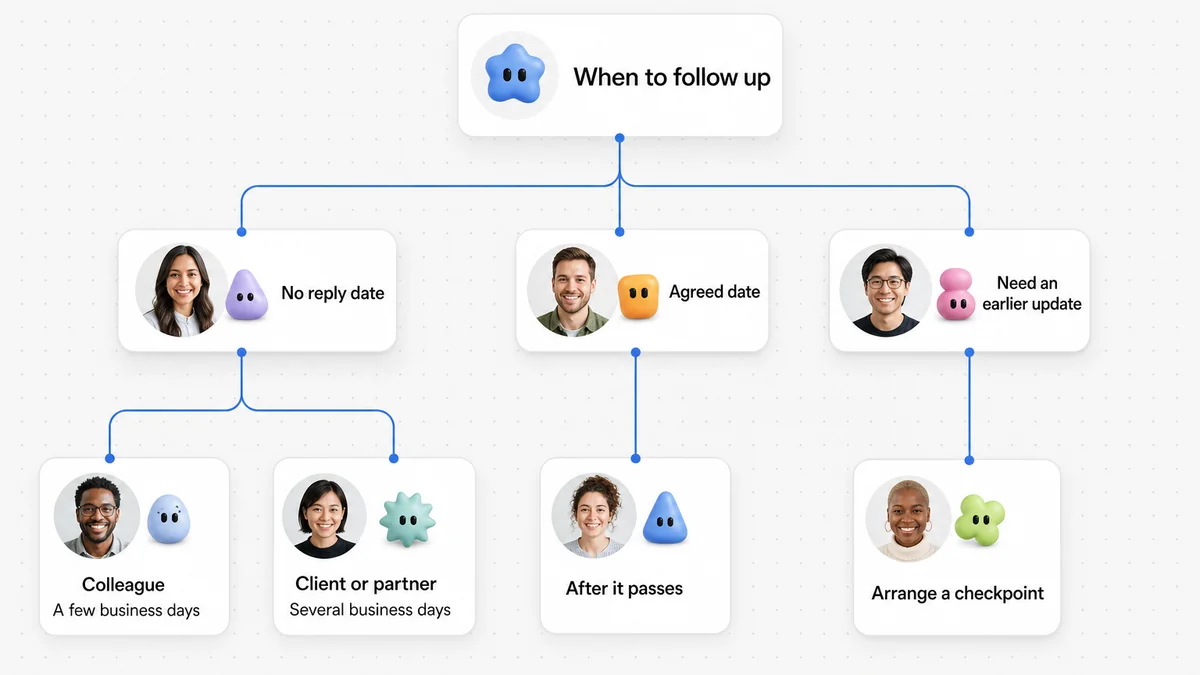
If you did not agree on a reply date, give your colleague a few business days for a routine request. If your work depends on theirs sooner, arrange a checkpoint when you agree on the task. That gives you a chance to catch delays without repeatedly asking how things are going.
Following up with clients and external partners
Clients, vendors, and prospective partners have other priorities to handle. If you sent a proposal, review draft, or contract without agreeing on a response date, allow several business days before following up. If you did agree on a review date, give them that day to respond before sending a reminder.
The UNC Chapel Hill Writing Center email guidelines explain that readers generally deal with email during normal business hours and may need several days to respond. Count business days when planning your reminders. Counting calendar hours can make a reasonable wait feel overdue and strain the relationship unnecessarily.
Following up with managers and senior leaders
When you need a decision, sign-off, or budget approval from a manager, follow up when the agreed response date passes. If you did not set one, allow time for a normal reply and explain any approaching dependency. Ask for the specific decision instead of broad thoughts so your manager can weigh it against other work.
When an agreed deadline has passed
You can follow up after a colleague or client misses an agreed deadline. Acknowledge that unexpected priorities come up, then state the missed date and explain what it affects. Ask for a revised estimate so you can adjust the schedule. Keeping blame out of the message makes it easier for the person to answer honestly.
Crafting subject lines that provide immediate context
"Checking in," "Status?", and "Quick question" tell the reader very little. They have to open the email to find out what you need and how urgent it is. That uncertainty can make a routine message feel more worrying than it needs to be.
Name the project and the decision or deliverable in the subject line. If you're continuing a conversation, reply in the existing thread so the reader has the earlier details to hand. They can review the history in seconds instead of searching for a separate email.
HubSpot discusses follow-up emails that connect to a clear objective and remind the reader of earlier conversations. Your subject line can make that connection before the reader opens the message.
These five examples show how to include the project and the reason for writing, even when someone is reading on a mobile screen:
- Project milestone check-in: Project Apollo: Status update on user testing schedule
- Client proposal review: Revised consulting proposal for Acme Corp: Next steps
- Decision or sign-off request: Approval needed: Q4 software subscription renewals
- Blocker resolution: Design assets for onboarding flow (launch dependency)
- Post-deadline check: Following up on the October monthly analytics report
Wording patterns that make updates easy to answer
A question that takes half an hour of research is easy to put off. A question someone can answer in thirty seconds is more likely to get a quick reply. Before sending your message, think about how much work you're asking the reader to do.
The Digital.gov guide to clear writing recommends writing for your audience and using active verbs to make responsibilities clear. For a status request, that means naming the person or task in your question and cutting words that don't help the reader answer it.
These three approaches help keep the request manageable.
1. Ask a targeted question instead of a broad one
"How are things going with the launch?" and "What is the latest on this?" ask the reader to summarize an entire project. Narrow the question to the information you need for your next step.
"Are the revised database migration scripts ready for review?" gives the person something specific to answer. They can confirm that the scripts are ready or tell you when to expect them.
2. Offer a low-friction reply option
If someone is busy, ask for an estimate or a choice between two options. They can give you enough information to plan without having to finish the task before replying.
For example: "If you are still working through the draft, a quick note confirming whether you expect to finish this week would be very helpful." A one-sentence answer is enough here. Make that clear so the person doesn't feel they owe you a full report.
3. Connect your inquiry to the next project step
Explain what depends on the answer. The reader should understand why you're asking now, without feeling criticized for taking too long.
"We are preparing the staging deployment for Friday and want to make sure your changes are included" gives a reason for the check-in. It ties the request to the project schedule and shows which work is waiting on the reply.
Worked Before and After editing examples
These four examples cut filler or adjust awkward phrasing while keeping the facts and requests the same.
Example 1: Removing vague filler from an everyday project check-in
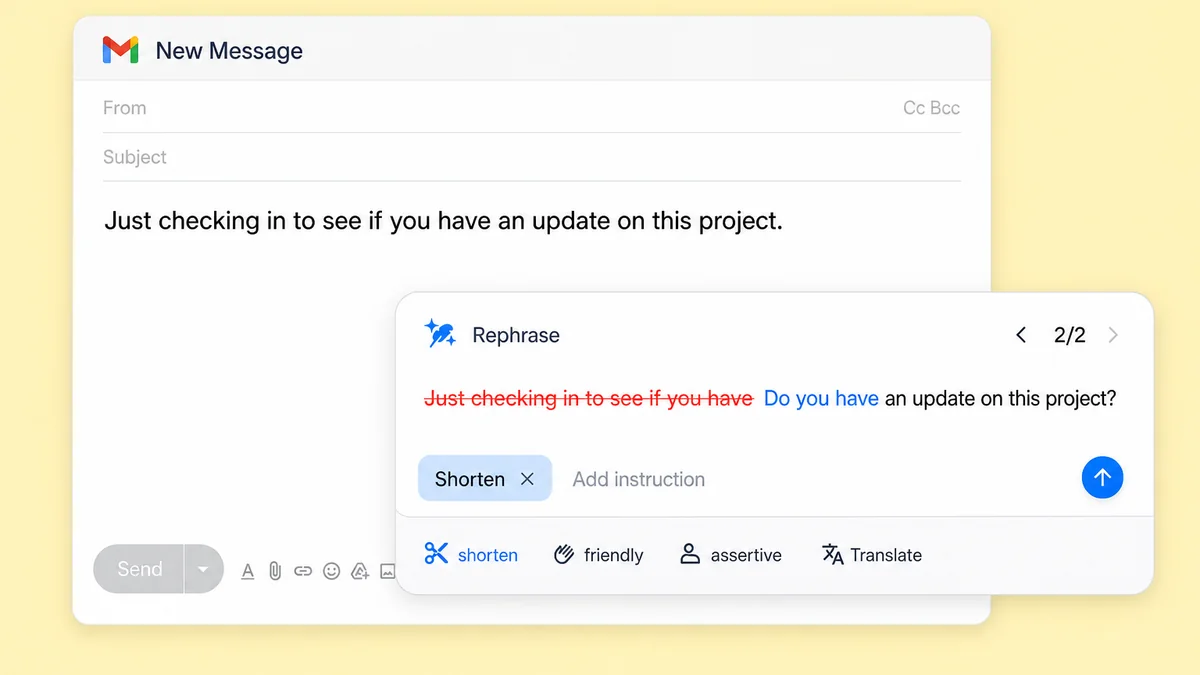
Before: Just checking in to see if you have an update on this project.
After: Do you have an update on this project?
Why this edit works: "Just checking in to see if you have" delays the question and makes it sound hesitant. The shorter version asks directly for the same project update. It adds no new facts or conditions.

Example 2: Cutting apologetic hedges from a client message
Before: I am really sorry to bother you, but I just wanted to ask if you had a chance to look over the revised budget proposal we discussed on Monday?
After: Have you had an opportunity to review the revised budget proposal discussed on Monday?
Why this edit works: A routine business request doesn't need an apology. Removing "I am really sorry to bother you" and "I just wanted to ask if you had a chance to" makes the question more confident without making it rude. The revised budget proposal and Monday discussion stay in the sentence, so the reader still knows exactly what you mean.
Example 3: Making an approval request more direct
Before: Could you please tell me if you approved the vendor invoice due tomorrow?
After: Please confirm whether you approved the vendor invoice due tomorrow.
Why this edit works: "Please confirm whether" states the request more clearly than the awkward "Could you please tell me if." It keeps "please" while removing the hesitant wording. The task is still approval of the vendor invoice, and the deadline is still tomorrow.
Example 4: Streamlining a team chat inquiry
Before: I was wondering if you might be able to send over the user interview notes from yesterday's session whenever you have some free time.
After: Please send over the user interview notes from yesterday's session when you have time.
Why this edit works: "I was wondering if you might be able to" makes the reader work through several qualifications before reaching the request. The edit starts with what you need: the user interview notes from yesterday's session. "When you have time" keeps the flexibility of the original without the extra words.
Short templates for email and chat
Replace the bracketed details with your own project information.
Template 1: Email to a colleague on an active project
Subject: Status update: [Project Name] deliverables for [Milestone]
Hi [Name],
I'm checking on [specific deliverable] for [Project Name].
We're preparing for [next project step or meeting] on [Date] and need your update to finalize the schedule.
Are you on track to share your draft by [Agreed Date]? If anything is holding it up, please let me know so we can adjust our plans.
Best regards,
[Your Name]
Template 2: Email to a client on a pending proposal
Pipedrive's follow-up examples include the case where a contact needs to consult colleagues. This template gives the client room to ask questions and share a review timeline.
Subject: Re: [Previous Subject Line or Proposal Name]
Hi [Client Name],
I'm following up on the [proposal or document name] we shared on [Date].
Do you have any questions about the scope or pricing? Please let me know if you need more information from our team before moving forward. An estimated review timeline would help us plan our availability.
Thank you for your time,
[Your Name]
Template 3: Email to a manager requesting a sign-off
Subject: Sign-off requested: [Document or Decision Title]
Hi [Manager Name],
Could you review and approve the [document or decision title] by [Decision Deadline]?
We need your sign-off to proceed with [next immediate action], scheduled for [Date or Time].
Here are the main points for quick reference:
- Summary point 1: [Key detail]
- Summary point 2: [Financial or operational impact]
Please let me know if you'd like to discuss any adjustments before signing off.
Best,
[Your Name]
Template 4: Brief chat message for Slack or Teams
Hi [Name], quick check on [specific deliverable]: are you still on track to finish by [Time/Day]? Let me know if you need any input from me.
Template 5: Following up when an agreed deadline has passed
Subject: Re: [Original Email Subject]
Hi [Name],
I'm following up on [specific deliverable], which was due on [Passed Date].
We need it to begin [dependent task]. Could you send an updated estimate of when you expect to finish?
If unexpected priorities or technical problems are holding things up, let me know so we can work through them together.
Best regards,
[Your Name]
Five habits to avoid when following up
Small wording choices can make a polite request sound impatient. Watch for these five habits when you reread your message.
1. Using passive-aggressive clichés
"Per my last email," "as stated below," and "re-attaching for your convenience" can look neutral on the page, but they usually sound condescending in a work message. They suggest the person failed to read what you sent. Restate the detail they need instead of pointing out that you've already provided it.
2. Sending empty one-line pings
"Any update?" and "Thoughts?" give the reader no context. They have to reconstruct the conversation before they can answer, which makes these reminders annoying to receive. Include the project name and the decision or deliverable you need, even in a short message.
3. Escalating channels too quickly
If you emailed this morning, don't send a direct message an hour later to ask whether the person saw it, unless there's an active production emergency. Switching channels that quickly interrupts their work and makes the request seem more urgent. Allow the normal response window before trying another channel.
4. Overusing artificial urgency and exclamation points
Save high-priority flags and "URGENT" subject lines for genuine emergencies. If every check-in is urgent, people learn to ignore the label. Multiple exclamation points can also sound erratic or sarcastic when you mean to be friendly. Keep the tone calm.
5. Demanding immediate answers without offering help
"Why is this not finished yet?" puts the reader on the defensive. Ask whether something is holding up the task and offer to help. "Let me know if you are facing any blockers on this" leaves room for the person to explain the delay and work with you on a solution.
For help with words that can cause confusion in work messages, see our guide to commonly confused words.
Adjusting message tone with Wordfully
Wordfully lets you make a drafted message friendlier, firmer, or shorter with one command where you type. You can add your own instructions to the prompt. See the tone features or our Wordfully writing guide.
If you polish a status request with AI, check the rewrite before sending so the deadline and project details stay as you intended.
Frequently asked questions about asking for a status update
How many times should you follow up before stopping?
There is no fixed number of follow-ups that applies to every situation. For routine internal work, one reminder after an agreed deadline may suffice, with a second only if it asks something specific.
What should you do if someone ignores multiple follow-up emails?
Avoid guessing why they have not replied. If you work in the same office, try visiting their desk. Otherwise, ask for a brief conversation or raise the question at a scheduled team standup. If an external partner stays silent, send a final polite note explaining that you'll put the project on hold until they have time to return to it.
How do you ask for an update when you do not have a hard deadline?
Explain that you're planning your schedule for the upcoming week and ask roughly when the person expects to review or finish the item. That gives you a timeframe for organizing your work and resources without adding a deadline that doesn't exist.
Is it better to send a chat message or an email for an update?
Use Slack or Teams for quick questions between teammates who work together daily, especially if a yes or no will do. Email works better when you need a written record, detailed attachments, or formal approval. It's also useful when several people need to stay informed.
How can you sound polite without apologizing for reaching out?
Replace "Sorry to bother you" or "I hate to bug you" with a warm greeting. You can thank the person for their time or acknowledge their workload, then ask your question. A clear, respectful request for an update is an ordinary part of working together.