
AI News Today, November 2026: What Changed for Writers Last Month

October 2026 brought a faster small model, a model Google says follows style instructions better, more focused document retrieval, and improved speech transcription. Releases from Google, Anthropic, Cohere, and IBM offer writers new ways to draft, edit, and prepare source material. The practical value depends on the task and the tool you can access, beyond what a benchmark score can tell you.
You don't need to follow every press release or rumor to choose a useful writing tool. Start with the work that slows you down. Waiting for a sentence suggestion is a different problem from finding a contradiction in a long report. These confirmed October 2026 announcements address those problems in different ways, with steps you can use in your own drafts.
Overview: What changed in AI writing tools in October 2026
Use this table to find the October 2026 release that fits the part of writing you want help with.
| Release | Primary capability | Impact on writing and editing | Action for writers |
|---|---|---|---|
| Anthropic Claude Haiku 5.5 | Fast small model with adjustable effort | Gives writers another option for short rewrites and summaries | Try it on a few sentence edits and compare the results |
| Google Gemini 4 Argon | Stronger style following and complex document work, according to Google | Can help review a long draft or synthesize supplied notes | Ask for a critique with source references, then check it |
| Cohere Rerank 5 Context Focus | Passage-level retrieval for applications built with it | Can surface relevant source passages for research workflows | Ask your tool provider whether it exposes source passages |
| IBM Granite Speech 5.0 | Improved transcription, punctuation, and speaker attribution across separate models | Gives interview and voice-note workflows a cleaner starting transcript | Compare the transcript with the recording before editing |
| Anthropic Agent Skills donation | A shared format for agent instructions | Can make editorial rules easier to reuse in compatible agents | Put a short style guide in a skill and test it in each tool |
Fast inline rephrasing: Anthropic Claude Haiku 5.5
On October 7, 2026, Anthropic released Claude Haiku 5.5, a small model built for quick, repeated tasks such as summaries and classification. It is Anthropic's fastest small model to date and the first Haiku model with an adjustable effort setting. Anthropic says Haiku 5.5 is available on all platforms, and developers can use it through the Claude Platform API.
Haiku 5.5's potential benefit for writers is quick feedback on small tasks. Try asking it to shorten a sentence or summarize a paragraph, then compare its answer with the original. Anthropic's announcement discusses speed and performance across general tasks; it does not establish that this model is the best editor for every sentence. The useful test is whether its suggestion preserves your meaning and saves you time.
If a tool offers Haiku 5.5, try it on a short batch of real edits. Note the response time, but also mark any changed facts, missing qualifications, or bland phrasing. A fast answer is valuable only when reviewing it takes less work than making the edit yourself.
A short sentence shows the kind of edit an inline assistant can make:
Before: The tool made an immediate suggestion to improve the text.
After: The tool suggested improving the text.
Replacing "made an immediate suggestion to improve" with "suggested improving" gets to the action sooner. The revision keeps the meaning and adds no claims. You don't have to dress up the sentence to make it clearer.

Use a fast model for sentence polishing if your tool makes one available. An AI writing assistant extension can also help you rephrase text inside apps such as Gmail, Google Docs, and Slack. Check which models that particular tool offers instead of assuming a new model announcement means it has already been integrated.
Coherent long-form drafting: Google Gemini 4 Argon
On October 13, 2026, Google announced Gemini 4 Argon. Google says it follows style instructions better than earlier Gemini models and communicates more directly. It is available in the Gemini app to Google AI Pro and Ultra subscribers and through the API for developers and enterprises.
Long drafts can lose their structure. Research reports, whitepapers, and book chapters are especially vulnerable to contradictory definitions or claims. You might find a term used one way in the introduction and another way later, whether a person or a model wrote the text. A review across the whole draft can expose those inconsistencies before publication.
Give Argon an outline and the draft, then ask it to list apparent contradictions with the passages on both sides. You can also ask whether a summary of meeting notes keeps the qualifications in the source. Google's announcement shows Argon working across project materials, but it does not promise a flawless developmental edit or automatic verification of every paragraph. Treat its answer as a list of places to inspect.
You still need to read that synthesis carefully. A reasoning model can make an interpretive mistake and express it in confident, convincing prose. Check whether it kept the conditions and qualifications in your notes. Our guide on how to check an AI rewrite walks through that review, including words such as "tentatively" and "under specific conditions" that are easy to lose.
When editing a conditional commitment, keep the condition visible:
Before: In the event that the client provides feedback before noon, our team can proceed with the revisions.
After: If the client provides feedback before noon, our team can proceed with the revisions.
"If" does the same job as "In the event that" without the legalistic wording. The condition, deadline, and promised action all stay in place. Check those details separately from whether the sentence sounds better.
More focused research: Cohere Rerank 5 Context Focus
On October 21, 2026, Cohere announced Rerank 5, a retrieval model for enterprise use that includes Context Focus.
Writers use retrieval systems to find facts from reference libraries, legal briefs, or technical documentation. A standard setup passes whole documents or large chunks of text to the drafting model. Give a model fifty pages to answer a single factual question, and it can confuse historical context with current findings or blend unrelated sections into an invented detail.
Context Focus works before the drafting stage in applications that implement it. It returns scored spans within retrieved documents, rather than only reordering whole documents. A developer can choose which passages to pass to a writing model; the writer should still open the full document when context could change the meaning.
For teams building research assistants, this gives editors a way to inspect the passages behind a generated claim. Cohere reports results for its retrieval and question-answering tests, not a measured reduction in errors in published articles. A short passage may also omit an exception elsewhere in a filing. Follow the link back to the full source before citing a date or figure.
You can apply the same approach when preparing your own research prompts:
- Filter your reference materials down to specific passages before asking an AI tool to draft a summary.
- Avoid pasting entire raw PDF documents into conversational prompts when you only require data from one section.
- Use tools that support character-level span extraction to link generated claims directly back to their primary source text.
Voice-to-draft transcription: IBM Granite Speech 5.0
On October 21, 2026, IBM's Granite team described three Granite Speech updates on Hugging Face. The updated Turbo CTC model adds native punctuation and capitalization. A separate update to Granite Speech 4.1 2B Plus improves speaker attribution for multi-speaker recordings. Pick the model that fits the recording rather than assuming one model does both jobs best.
Speaking can be easier than typing into a blank document. You can talk through an opening chapter, outline, or rough essay without stopping over every sentence. Older dictation tools often left you with plenty of cleanup, though. Speech models often produced endless runs of text without commas, periods, or capitalization, while struggling to distinguish between different participants in an interview.
The punctuation update can make a voice note easier to read on the first pass. For an interview, the speaker-attribution update can help separate contributions. Neither removes the need to listen again: names, specialist terms, and who said a consequential sentence all deserve a check against the audio.
This example shows what sentence boundaries add to a spoken note:
Before: we met with the engineering director yesterday morning to discuss the platform migration and she agreed to provide the revised architecture diagrams by Tuesday afternoon
After: We met with the engineering director yesterday morning to discuss the platform migration. She agreed to provide the revised architecture diagrams by Tuesday afternoon.
The edit turns the continuous transcription into two capitalized sentences. It preserves all names, times, and commitments, including the Tuesday afternoon deadline.
Open standards for style guides: Anthropic Agent Skills Donation
On October 22, 2026, Anthropic announced it was donating Agent Skills to the Agentic AI Foundation under the Linux Foundation. Agent Skills is an open, vendor-neutral standard for giving AI agents structured instructions, workflows, and domain knowledge.
Keeping a writing assistant faithful to a house style can take repeated work for editorial teams and freelancers. Traditionally, style guides lived in separate documents or long prompt introductions that writers copied into each new chat. Tools interpreted the same rules differently, leaving published articles with an uneven tone.
The donation gives the format a vendor-neutral home. Compatible agents can read a skill folder containing a SKILL.md file with instructions and supporting material. An editorial team could put capitalization rules, preferred terms, and examples there, then test whether each agent follows them. The announcement does not mean every browser writing tool supports skills or applies a shared guide in the same way.
To prepare for this standard:
- Document your publication's core editorial guidelines in concise, rule-based markdown files.
- Group instructions logically, separating grammar conventions from industry-specific vocabulary.
- Review your tone guidelines to ensure they state concrete formatting requirements rather than vague aesthetic advice.
Step-by-step workflow: Updating your writing routine this month
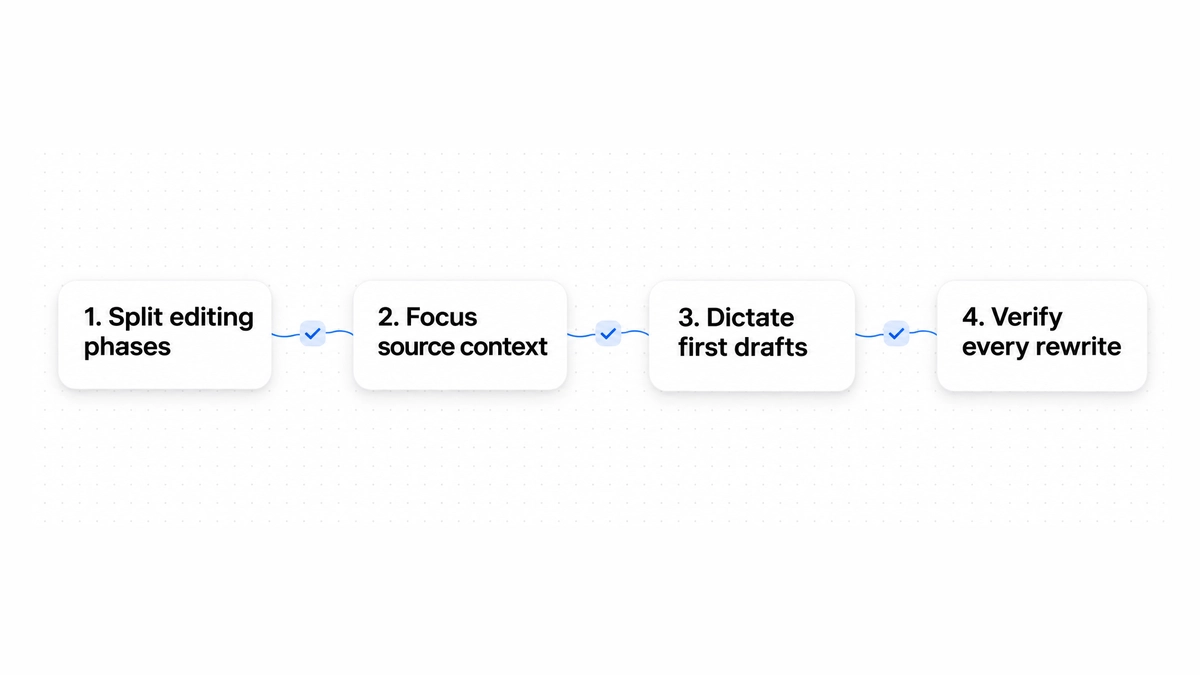
Use these four steps to fit the October 2026 changes into your writing routine.
Step 1: Divide editing into two distinct phases
Separate sentence edits from structural review instead of giving both jobs to the same model or prompt. Use fast models for sentence edits, such as fixing comma splices, removing passive voice, and tightening wordy sentences. Give deeper reasoning models work that requires reading across a draft, such as evaluating chapter transitions, testing argument coherence, and synthesizing multi-source research notes.
Step 2: Restrict source context to relevant passages
Before drafting from research, identify the evidence you need instead of pasting whole books or report filings into a prompt. Follow the principle behind Context Focus: isolate relevant paragraphs, tables, or quotes, and retain their source links. Then read enough surrounding text to catch limitations and exceptions. Focused context can reduce noise; it cannot guarantee an accurate claim.
Step 3: Dictate first drafts to bypass blank-page hesitation
If starting an article or chapter is the hard part, record yourself talking through the topic. The recording can be unstructured. A transcription tool with punctuation and capitalization can give you a working draft. Review difficult words and names against the recording, then polish the prose using an editing tool.
Step 4: Run a dedicated verification pass on every rewrite
Compare a suggested rewrite directly with your original before accepting it. Give conditions, numbers, and tone their own check instead of reading only for fluency. When drafting delicate workplace messages or follow-up notes, consult our practical guide on how to ask for a status update to ensure your requests remain polite, clear, and professional.
Four common mistakes writers make with new AI tools
1. Treating reasoning ability as factual accuracy
A well-organized argument can still be wrong. Reasoning models are good at arranging complex data and making a case, but they can also invent information. Always cross-check technical specifications, historical dates, and statistical figures against primary documentation.

2. Over-prompting fast inline rewriters
Keep a quick sentence-editing request short. Asking a fast model to follow twenty complex style constraints at once slows processing and often produces stiff phrasing. For simple rephrasing, ask for clarity, conciseness, or a specific tone change, and evaluate the suggested result manually.
3. Publishing raw transcription output without structural pruning
Punctuation doesn't remove the repetition in speech. When people talk, they frequently circle back to points, use filler phrases, and rephrase thoughts multiple times. Read the transcript for those habits and cut conversational tangents before bringing it into your manuscript. A readable transcription is still a first draft.
4. Chasing model benchmarks instead of workflow ergonomics
It's easy to spend hours comparing model scores. A slightly better academic benchmark matters less to daily writing than a tool that works comfortably where you type. Prioritize tools that operate directly where you type, support fast response times, and give you complete control over which edits to accept.
How Wordfully integrates multi-model writing assistance
Wordfully uses different AI capabilities for different writing tasks. Its inline Chrome extension works in Gmail, Google Docs, Slack, Notion, and LinkedIn, so you can edit inside the application where you're drafting.
The one-click multi-fix tooltip handles several grammar and spelling mistakes in a sentence. For deeper rewrites, you can select a sentence and choose tone adjustments, including friendlier, firmer, or shorter phrasing.
For rewrites, you can choose GPT, Claude, Gemini, DeepSeek, Grok, Kimi, or GLM, or let Auto choose. If a suggestion sounds wrong, try another model and compare the proposed edits. Wordfully's existing product overview describes the model choices, but it does not claim that any of these October releases has already been added.
You control which suggestions to accept. You can keep a revised verb and reject the rest of the proposed edit if it doesn't sound like you. See the writing features or visit pricing for available plans. Pro includes a 7-day full refund when you cancel within 7 days of paying.
Frequently asked questions
Do faster models like Claude Haiku 5.5 reduce writing quality?
Speed alone does not tell you whether an edit is good. Anthropic describes Haiku 5.5 as fast and suited to narrow, repeated tasks, but its announcement does not measure the quality of your particular grammar or tone edits. Compare a few suggestions with your originals, then choose the tool that gives you useful edits with manageable review time.
Can reasoning models replace human developmental editors?
No. While reasoning models like Gemini 4 Argon can track outlines and spot logical inconsistencies across long drafts, they lack subjective literary taste, cultural context, and an understanding of human emotional nuance. Use their comments to find places worth reviewing. Decisions about structure, pacing, and tone remain with the writer.
Does passage-level retrieval prevent factual errors?
Context Focus returns scored passages that a developer can pass to a model. This may make it easier to find supporting text, but the passages are selected by another model and can omit relevant context. Open the original document, confirm the passage supports the claim, and check nearby exceptions before publishing.
What is the most effective way to turn voice notes into articles?
Record your thoughts in focused three-to-five-minute segments covering single ideas. Run the recording through a speech model that includes native punctuation and capitalization, such as Granite Speech 5.0. Once you have the text, perform a quick structural pass to cut conversational filler, then use an inline rephrasing tool to tighten the remaining sentences.
How should writers decide between different AI models?
Match the model to the scope of your editing task. Use fast, lightweight models for real-time proofreading, vocabulary suggestions, and quick sentence shortening where low latency is critical. Switch to frontier reasoning models when you need to outline a multi-chapter report, synthesize conflicting research sources, or review an extended draft for thematic consistency.