
How to Make AI Text Sound Human

To make AI text sound human, give the tool something of your own to work with: spoken notes, writing samples, and the details that matter to your project. Then guide its sentence structure and edit the draft yourself. Large language models predict likely sequences of words. Without your context and judgment, the result tends to sound polished but generic.
Readers notice whether you know your subject and have something worth saying. Aim for writing that carries your observations, your usual phrasing, and a clear point of view.
Why raw AI drafts sound impersonal
Spelling and grammar are rarely the obvious problems in an AI draft. More often, you notice the same sentence openings, transitions, and paragraph shapes over and over. Each sentence reads smoothly on its own, but the whole piece feels mechanical.
The Netzhirsch guide to ChatGPT prompting points to repeated constructions and missing concrete details as common problems in unedited drafts. Those are useful things to look for because you can correct them with your own examples and a careful revision.
Watch for five recurring habits:
-
Repeated sentence openings: Unedited drafts start the vast majority of sentences with the grammatical subject, such as "The system enables," "This approach delivers," or "Writers must consider." There's nothing wrong with any one of these. Read ten in a row, though, and the rhythm starts to drag.
-
Mechanical transitions: Words such as "furthermore," "moreover," "in addition," and "additionally" can connect paragraphs without explaining how the ideas relate. The reader still needs to know whether one event caused another or why the next point follows.
-
Tidy paragraph endings: Models often finish with a punchline or sweeping takeaway when a practical detail would do. "This marks a pivotal step toward future success" says little about what happened or what to do next.
-
Balanced pairs and triplets: Ideas arrive in neat groups such as "efficiency, scalability, and innovation," or in constructions such as "not only did it save time, but it also reduced errors." Human speech is less evenly arranged.
-
Inflated importance: An ordinary software update becomes "a testament to technological excellence" or "a transformative milestone in modern workflow management." The wording gives a routine task more weight than it deserves.
Banning a word can produce a synonym while the sentence pattern stays the same, as the Netzhirsch guide to ChatGPT prompting notes. Change how you plan and prompt the draft, then check its rhythm during editing.
Give the model your own material before prompting
"Write a guide about project management" gives a tool a topic but very little else. It has to supply the structure and voice from generic web material. Without your input, the article could have been written for anyone.
Before asking for a draft, collect the thoughts and details you want it to contain. Your own wording gives the model a starting point beyond the topic name.
Record and transcribe spontaneous voice notes
Speaking to a colleague brings out vocabulary you might not reach for while staring at a blank text box. You use active verbs, natural pauses, and everyday transitions. Your emphasis also makes it clear which points interest you and which are secondary.
Take two to three minutes to record a voice note on your phone or computer. Explain your main point, describe one obstacle you encountered, and say why the reader should care. Transcribe the recording and paste it into the prompt as reference material. Ask the tool to organize those ideas while keeping your vocabulary and direct statements.
Give the model samples of your past writing
Paste two or three paragraphs from your published articles, newsletters, or client emails into the prompt. The model can pick up sentence lengths, vocabulary, and structural patterns from that immediate context. A sample gives it a more useful reference than a request to "sound like me."
Ask it to look at specific habits:
- How you mix short fragments with longer explanations.
- How formal you are and how you greet people.
- Which terms and industry phrases you use.
- Whether you use parentheses, rhetorical questions, or bullet points.
These details give the tool a pattern to follow instead of its usual corporate tone. Choose prose that sounds like you, including the small habits you want to keep.
Supply the facts and boundaries
When a tool lacks concrete details, it can fill the gaps with vague or made-up claims. Give it the information it needs before asking it to draft:
- Exact software versions, tool names, or equipment names.
- Measurements, timeframes, and budget figures.
- Policies, constraints, and exceptions that apply.
- Your opinions, including where you disagree with common industry advice.
Those details give the draft substance. They also tell the tool where it must be precise and which boundaries it needs to respect.
Prompt for sentence structure instead of banning words
A request to "sound conversational" often brings exclamation marks, forced jokes, and rhetorical questions. Be more specific about how the sentences should work.
The Netzhirsch prompting analysis points to flexible syntax and natural connections between sentences as sources of rhythm. You can ask for those directly:
- Vary sentence starters: Ask the tool to notice when several sentences begin the same way. Other openings might use a prepositional phrase ("During initial testing..."), a condition ("If the budget allows..."), or a time marker ("Last month...").
- Connect each thought to the previous one: Instead of relying on "furthermore," "moreover," or "consequently," refer back to something the reader has just encountered. "That requirement," "This delay," and "Those settings" make the connection explicit.
- End paragraphs on something useful: Ask for an explanation, a limitation, or a next step. A philosophical summary or slogan usually adds little.
- Avoid automatic triplets: Let a point stand alone or pair it with a related idea instead of arranging everything in sets of three.
Use two or three directions at a time. Too many rules can make the result awkward in a different way, such as seven consecutive sentences beginning with the same preposition. Handle the remaining problems when you edit.
Four manual editing passes to personalize an AI draft
Even a carefully prompted response needs editing. Trying to check grammar, tone, flow, and facts in one read makes it easy to miss something. Give each of these four passes a separate job.
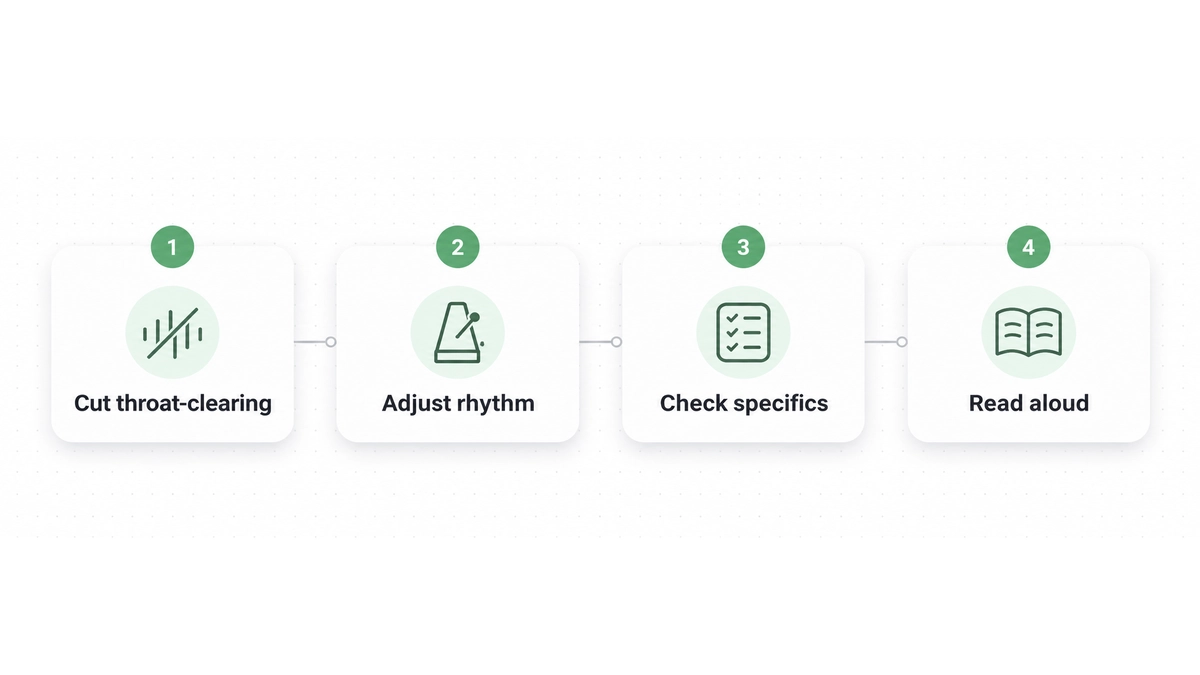
Pass 1: Cut throat-clearing and announcements
Look for sentences that announce information instead of giving it. These phrases delay the point:
- Opening platitudes such as "In today's fast-paced digital world" or "In the modern era of remote work."
- Signposts such as "It is important to remember that," "It is worth noting that," and "Let us delve into."
- Section introductions such as "In this section, we will explore the multifaceted nature of..."
Delete the warm-up and start with the information itself. You don't need to tell readers that a point matters before explaining it.
Pass 2: Adjust the rhythm and sentence lengths
AI drafts often settle into medium-length compound sentences joined by commas and semicolons. That steady rhythm can make even useful information tiring to read.
Look at the sentences together, not just one at a time:
- Shorten a sentence when you want an important rule or conclusion to stand out. A five-word sentence can make the reader pause.
- Join choppy fragments when they describe a sequence. Show how one event leads to the next.
- Apply the Digital.gov plain language guidelines, which recommend active voice and present tense. Naming the person who acts makes responsibility clear; passive wording can hide it and sound bureaucratic.
Read the paragraph aloud. If your voice falls into a monotone, split a long sentence or try opening the next thought with a direct question. Listen to whether the change helps the paragraph rather than judging the sentence alone.
Pass 3: Check specifics and state your judgment
Phrases such as "could potentially be considered," "tends to suggest," and "many experts argue" can make a draft sound unwilling to take a position. Check whether that caution belongs to you or came from the tool.
Use this pass to restore what you mean:
- Replace unnecessary hedges with your own judgment. If an approach failed in your experience, say plainly that it doesn't work.
- Replace abstract language with concrete terms. "Assigned two engineers to the task" tells the reader more than "optimized resource allocation."
- Compare factual statements, deadlines, and technical specifications with your project notes. Our guide on how to check an AI rewrite has a detailed checklist for protecting numbers and conditions during revision.
Pass 4: Read the whole draft aloud
Read at a normal conversational pace. Notice where you stumble, run out of breath, or hear a word you wouldn't usually use. If "heretofore," "paramount," or "synergistic" would sound strange in a client meeting, replace it with what you'd say in person.
For workplace messages, listen for both politeness and directness. You want the request to be clear without sounding abrupt. Our guide on how to ask for a status update gives templates and advice for finding that balance.
Comparison of AI drafting patterns and human revisions
Use this table to check which habits remain in your draft.
| Text element | Typical raw AI pattern | Humanized editorial approach |
|---|---|---|
| Sentence openers | Several sentences in a row begin the same way | Mix of subjects, prepositional phrases, and time markers |
| Connective tissue | Formulaic adverbs ("furthermore," "moreover") | Contextual backward references and logical flow |
| Paragraph conclusions | Grand philosophical punchlines or summaries | Concrete qualifications, dependencies, or next steps |
| Sentence structure | Symmetrical compound sentences and triplets | Varied lengths: short punchy lines mixed with longer explanations |
| Tone and stance | Timid passive hedging ("may arguably be seen as") | Decisive active voice and firsthand professional perspective |
| Word choice | High-register corporate clichés ("delve," "pivotal") | Plain language, precise domain terms, and natural vocabulary |
Worked Before and After editing examples
The examples below illustrate how to repair specific machine habits without rewriting the entire piece. In each case, the After version preserves all underlying facts while removing the artificial phrasing.
Example 1: Cutting introductory announcements and throat-clearing
Before: It is crucial to note that we must optimize our team workflow.
After: We must optimize our team workflow.
Why this edit works: The phrase "It is crucial to note that" is an empty announcement that delays the core message. Removing those six words makes the sentence direct and assertive while keeping the exact action intact.
Example 2: Eliminating formulaic transitions and inflated significance
Before: Furthermore, this solution serves as a testament to our ongoing technical progress.
After: This solution demonstrates our technical progress.
Why this edit works: The unedited sentence used the mechanical transition "Furthermore" and the inflated cliché "serves as a testament to." Replacing those elements with the active verb "demonstrates" preserves the claim while eliminating the artificial rhetoric.
Example 3: Simplifying bureaucratic jargon into plain workplace language
Before: In order to streamline cross-functional alignment, we should schedule a brief synchronization session.
After: We should schedule a short meeting to align the team.
Why this edit works: Words like "streamline cross-functional alignment" and "synchronization session" make routine collaboration sound stiff. Simplifying the vocabulary keeps the meeting request and its purpose while sounding like an actual coworker.
Example 4: Dismantling artificial parallel structures
Before: Not only did the deployment improve query latency, but it also reduced server load across all regions.
After: The deployment improved query latency and reduced server load across all regions.
Why this edit works: The "not only... but also" construction is an overused rhetorical flourish in machine writing. Converting the sentence into a simple compound predicate keeps both performance outcomes without the dramatic posturing. Watch for easily confused vocabulary during these sentence cleanups; our reference on commonly confused words covers pairs that spellcheckers routinely overlook.
Common mistakes when making AI text sound human
Some attempts to remove AI phrasing leave the draft harder to read. Watch for these problems while you edit.
Mistake 1: Changing words without checking the sentence
Replacing every familiar phrase with an unusual synonym can make a good sentence worse. Read the paragraph as a whole before you change a word. If the point is vague, a rare adjective will leave it vague. Add the observation or example that makes the point useful.
Read for meaning and accuracy first. Then revise the sentence that still sounds unlike you, keeping any plain words that already do their job.

Mistake 2: Accepting a whole-sentence rewrite for a weak phrase
Before clicking "Accept," check how much of the suggestion you need. A clearer verb may help, while changes elsewhere in the sentence shift the tone or remove a necessary nuance.
Keep the improved word or clause and leave the parts that already work. You don't need to replace your entire sentence to fix one weak phrase.
Mistake 3: Polishing a draft that has little to say
Style can't supply missing ideas. The Google Search Central guidelines on helpful content emphasize original reporting, substantial analysis, and perspectives that go beyond the obvious.
If the draft only repeats basic web definitions, return to your notes. Add the experience or practical problem-solving that gives you a reason to write about the subject. Sentence editing will be more useful once there's something specific for the reader to learn.
Using Wordfully to maintain your personal writing voice
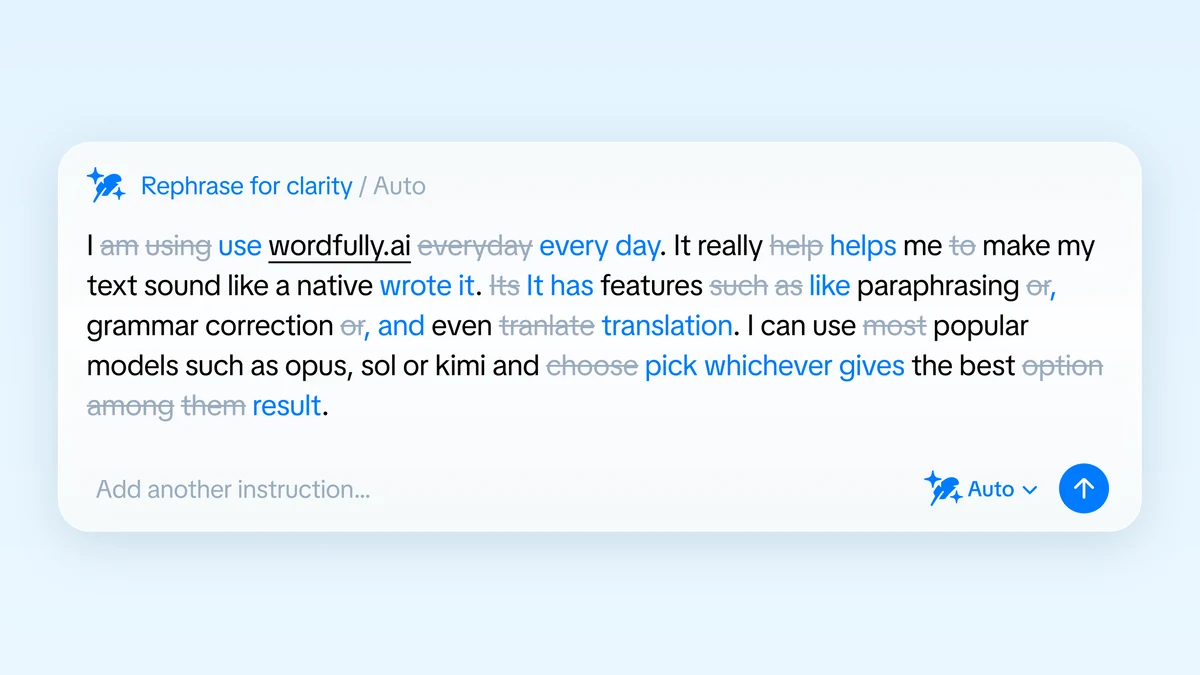
Wordfully is an AI writing assistant extension that works inside web apps including Gmail, Google Docs, Slack, Notion, and LinkedIn. It offers suggestions as you type, so you can edit where you're already working without copying the draft to a separate editor.
Every rephrase in Wordfully is humanized by default, and you choose which edits to keep. You can take a clearer verb while preserving the rest of your sentence. You can choose GPT, Claude, Gemini, DeepSeek, Grok, Kimi, or GLM, or let Auto choose. Our AI writing assistant extension guide explains how inline fixes work across platforms, and the grammar and writing features page covers the available tools.
Wordfully Pro includes a 7-day full refund policy. Try it on your daily emails, reports, and working documents for a week. If it doesn't fit your routine, cancel within seven days of purchase for a complete refund. After that, you can still cancel at any time, and Pro access continues until the end of your billing cycle. Current plans are on our pricing page.
Frequently asked questions about making AI text sound human
Can language models learn my writing style permanently?
Many chat interfaces and writing platforms let you save custom instructions or project profiles. Put your sentence guidelines, formatting preferences, and writing samples there so new drafting sessions start with those references. The saved settings give the tool your preferences without requiring you to paste them into every prompt.
How do I know when the draft sounds like me?
Compare it with a piece you wrote without AI help. Look at how you open paragraphs, where you use short sentences, and which words you would say aloud. If the draft contains your real observations and you can read it without stumbling over borrowed sounding phrases, it is ready for the usual final fact check.