
ChatGPT Grammar Check: Prompts and Examples

To run a ChatGPT grammar check, paste your text into ChatGPT and ask it to fix grammar, spelling and punctuation without changing your meaning. Read the edits before you use them, because ChatGPT can rewrite more than you asked for.
Use the GPT models behind ChatGPT inline on most websites
Copying every draft into a chat tab and back gets old quickly. If you'd rather skip that, try Wordfully for Chrome. Pick GPT in the model picker and your rewrites run on OpenAI's GPT models, the same models behind ChatGPT. You get those rewrites inline in Gmail, Google Docs, Slack, Notion, LinkedIn and most other web apps, and you decide which edits stay. Wordfully is an independent extension and isn't affiliated with OpenAI.
ChatGPT sentence correction: fix grammar and spelling
Open ChatGPT, paste one sentence, and ask:
Fix grammar, spelling and punctuation only. Preserve my meaning and wording wherever possible. Return the corrected sentence. Text: """[your sentence]"""
Illustrative example:
Before: She dont recieve emails.
After: She doesn't receive emails.
Compare the correction with your original before using it.
How ChatGPT checks grammar compared to traditional tools
Dedicated grammar checkers often combine rules and models trained to detect errors. For a subject-verb agreement mistake, an inline checker can underline the faulty word and offer a replacement. You can correct that word without changing the surrounding sentence.
ChatGPT uses your draft and instructions to generate a response. The Purdue Online Writing Lab proofreading guide recommends checking specific error categories, including comma splices and homophones. Unless you ask for a list of individual errors, ChatGPT may give you a complete revised draft.
Fluency and minimal editing don't always go together. An evaluation published on arXiv found that ChatGPT produced fluent corrections while tending to overcorrect and depart from minimal edits. Research presented at EMNLP describes excessive overcorrection in large language models as a precision problem.
Why default prompts produce over-editing
Broad requests leave ChatGPT plenty of room to make changes. "Proofread this," "check my grammar," and "make this sound better" don't tell it which parts of your draft to leave alone.
With an open-ended request, three kinds of unwanted edits are common:
- Simple verbs like "use," "start," or "build" become corporate wording such as "leverage," "initiate," or "architect."
- Short sentences get merged into longer clauses, with transitions like "furthermore" and "moreover" replacing your rhythm.
- Ambiguous wording prompts the model to guess what you meant and add details that weren't in your draft.
These changes help explain why an AI rewrite can sound generic even when the grammar is fine. Familiar wording replaces the choices that made the draft sound like you. For help editing longer documents, see how to make AI text sound human.
Four prompts that turn ChatGPT into an effective grammar checker
Tell ChatGPT what it may change and what it must preserve. The official OpenAI Prompt Engineering Guide explains that precise instructions help models follow a task and that generated output can vary. The prompts below specify both the editing scope and the response format; you still need to check the result.
1. The minimal-edit proofreader
Use this prompt to fix spelling, punctuation, and syntax errors while keeping your sentence structure and word choice.
You are a strict proofreader. Inspect the text delimited by triple quotes for mechanical errors, including spelling mistakes, punctuation errors, grammatical agreement issues, and incorrect word usage.
Follow these rules:
- Fix only clear grammatical, spelling, and punctuation errors.
- Do not rewrite sentences that are already grammatically correct.
- Preserve the author's original voice, sentence length, and vocabulary.
- Return only the corrected text without preamble, commentary, or summary.
Text: """ [Insert your draft here] """
2. The three-column corrections table
Ask for a table when you want to inspect each correction before accepting it. You can compare the original wording with the suggestion without reading a full replacement paragraph.
Review the text delimited by triple quotes for grammatical and typographical errors. Do not rewrite the full paragraph. Instead, output a Markdown table with three columns:
Column 1: Original text span containing the error Column 2: Corrected text span Column 3: Specific grammatical rule or reason for the correction
If the text contains no errors, output: "No grammatical errors found."
Text: """ [Insert your draft here] """
The three-column format asks for a reason for each edit and keeps the output focused on corrections. Check whether each reason holds up before deciding what to keep.
For inline rewrites, Wordfully runs on OpenAI's GPT models, the same models behind ChatGPT. Pick GPT or let Auto choose the model, and you decide which edits stay.
3. The rule-explanation prompt
If a sentence feels awkward and you aren't sure why, ask for an explanation of its grammar and two possible fixes.
Analyze the grammatical structure of the sentence delimited by triple quotes.
Identify any syntax issues, dangling modifiers, comma splices, or agreement errors. Explain the rule involved and show two alternative ways to resolve the issue while keeping the original meaning. Do not change technical terminology.
Sentence: """ [Insert your sentence here] """
4. The workplace email proofreader
A work email should be courteous without sounding stiff or overly deferential. This prompt asks for grammar fixes while keeping the message concise and preserving its dates and deadlines.
Proofread the professional email delimited by triple quotes.
Repair spelling, punctuation, and syntax errors. Keep the tone courteous, concise, and direct. Do not add corporate clichés, sycophantic greetings, or filler transitions. Preserve all dates, project names, and deadlines exactly as written.
Email draft: """ [Insert your email draft here] """
What ChatGPT can catch
With clear instructions, ChatGPT can catch several kinds of mistakes that simple spellcheckers miss.
Subject-verb agreement across long clauses
A long gap between a subject and its verb can confuse a simple spellchecker. ChatGPT is good at following the relationship across intervening clauses. In "The collection of rare books from several private estates were auctioned," the subject is the singular "collection," so the verb should be "was auctioned." The plural nouns between them don't change that agreement.
Run-on sentences and comma splices
Joining two independent clauses with only a comma creates a comma splice. ChatGPT can spot these in complex paragraphs where a word processor may miss them. Depending on your instructions, it can add a coordinating conjunction, use a semicolon, or split the sentence in two.
Confused words in simple contexts
A word can be spelled correctly and still be wrong for the sentence. ChatGPT uses the surrounding text to catch mix-ups such as "their" and "there," "affect" and "effect," or "compliment" and "complement." A spellchecker that only checks dictionary entries will miss them. Our guide to commonly confused English word pairs covers twenty pairs worth checking.
Clunky non-native phrasing
An idiom translated directly into English may follow the grammar rules but still sound unnatural. ChatGPT can recognize unusual word combinations and suggest a more natural English phrase, saving you a manual dictionary lookup.
What ChatGPT misses, invents, or distorts
Some unwanted edits are harder to spot than a typo because the revised sentence reads well. Check meaning and terminology even when the result sounds smooth.
Hallucinated corrections on technical jargon
ChatGPT may mistake an industry term, acronym, or internal product name for a typo. A software parameter named "auth_config" might become "author configuration." In legal writing, replacing a precise term with a conversational summary can change its meaning and carry unintended liability. Check these terms against your draft before accepting a correction.
Erasure of intentional stylistic choices
Fragments, one-sentence paragraphs, and openings like "And" or "But" can be deliberate choices. ChatGPT tends to treat them as errors and turn them into more uniform, textbook-style sentences. Keep a stylistic choice when it gives the emphasis or conversational tone you intended.
Inconsistent corrections across long documents
ChatGPT processes text within a rolling context window, and its corrections can become inconsistent across a long document. It might spell out numbers in section one ("fourteen members") and use numerals in section three ("14 members"). It can also switch between American and British spelling unless you ask it to follow one convention throughout.
Worked Before and After editing examples
The following four examples show how to evaluate possible suggestions. The preferred revisions preserve the draft's facts, details, and deadlines; sometimes the best correction is to leave a sound sentence alone.
Example 1: Resolving subject-verb agreement and tense conflict
Here is a sentence with an agreement error and conflicting tense markers:
Before: Each of the committee members have submitted their draft yesterday.
After: Each of the committee members submitted their draft yesterday.
The singular "each" rules out "have," and "yesterday" calls for the simple past "submitted."
Example 2: Preventing corporate over-editing in a status update
Here is a concise operational status note:
Before: We hit a database connection error at noon, so the deployment was paused for forty minutes.
An overedited version might read: "Our development team encountered an unforeseen operational bottleneck regarding database connectivity at midday, resulting in a temporary forty-minute postponement of the scheduled deployment sequence."
That version adds an unsupported team and makes a simple note harder to read. The original sentence is grammatically sound, so the preferred version keeps it verbatim:
After: We hit a database connection error at noon, so the deployment was paused for forty minutes.
Example 3: Preserving conditional commitments
Here is an update regarding a contract negotiation:
Before: The client may sign the extension next week if legal approves the revised indemnity clause.
An unsafe rewrite would be: "The client will sign the extension next week once legal finalizes the revised indemnity clause."
That rewrite introduced two factual changes: it changed "may sign" to "will sign" and "if legal approves" to "once legal finalizes."
The corrected version retains the exact conditional boundaries:
After: The client may sign the extension next week if legal approves the revised indemnity clause.
No grammatical changes were needed. By comparing the AI suggestion against the original draft, the writer avoided committing to an unapproved agreement. For a structured five-step review process to catch these errors, consult our checklist on how to check an AI rewrite before sending it.
Example 4: Fixing a comma splice without changing vocabulary
Here is a project summary with two independent clauses incorrectly joined by a comma:
Before: The quarterly audit concluded yesterday, the finance team discovered no major discrepancies.
After: The quarterly audit concluded yesterday, and the finance team discovered no major discrepancies.
The original sentence contains a comma splice. A more elaborate rewrite, such as "Concluding yesterday, the quarterly audit revealed that the finance team discovered no major discrepancies," would muddy who found the discrepancies. Adding "and" repairs the punctuation while keeping both clauses intact.
Step-by-step verification workflow for ChatGPT grammar edits
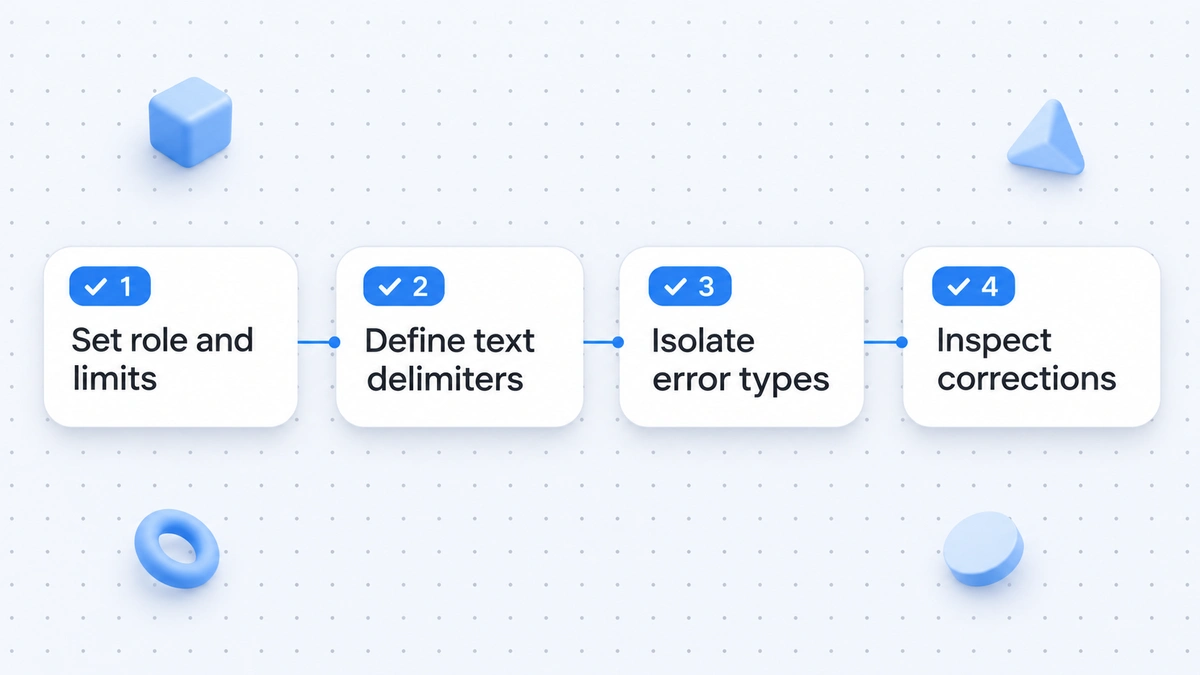
Before pasting a ChatGPT correction into an email, report, or publishing system, compare it with your draft. Use this four-step routine to check both the instructions and the result.
Step 1: Use strict delimiters in your prompt
Put your draft inside clear markers, such as triple quotation marks or XML tags. These separate the text to proofread from your instructions, so questions inside the draft aren't treated as questions for ChatGPT to answer and the draft isn't mistaken for a request to summarize.
Step 2: Run a side-by-side comparison
Keep your original on the left and the revision on the right. Read line by line, looking for added or removed words. If three words changed in a sentence where only one was misspelled, undo the other two changes. Reading only the revised version makes those extra edits harder to notice.
Step 3: Audit numbers, names, and conditional words
Give the details their own pass. Compare dates, currency figures, percentages, and proper nouns with the original. Then check words that express uncertainty or obligation: "might," "could," and "may" should not have become "will," "shall," or "must."
Step 4: Verify whether the change fixes a real grammatical rule
Ask which rule each suggestion fixes. If you can't find a problem with agreement, spelling, punctuation, or clarity, reject the edit. A different word isn't necessarily a better word, and you don't need to accept it just because the tool suggested it.
Common mistakes when using ChatGPT for grammar checking
Watch for these three habits when reviewing grammar suggestions:
- Letting the tool edit citations and quotations. Changing the exact wording of a direct quote while fixing its grammar can violate journalistic and academic standards.
- Treating good grammar as proof of accuracy. A smooth sentence can still be false. Check the facts separately.
- Pasting sensitive material into a public chat. Confidential customer data, proprietary code, and legal drafts may be covered by company privacy policies or data protection agreements.
When an inline browser checker is faster and more practical
ChatGPT can help with detailed grammar questions and bulk text review. For a quick email or chat message, though, moving the draft into a separate interface adds work.
The copy-paste tax
Checking an email or Slack update in ChatGPT means working through these steps:
- Opening a browser tab or switching windows to the chat interface.
- Typing or pasting your prompt instructions.
- Pasting your draft and waiting for the model to generate a response.
- Reviewing the full output to ensure the model followed your rules.
- Copying the text back into your email or document editor.
- Re-applying lost formatting, such as bold text, bullet points, and hyperlinks.
Those extra steps can take longer than the original draft, especially for short messages. If you write across Gmail, Google Docs, Slack, Notion, and LinkedIn, repeatedly switching to a chat window interrupts your work.
To get rewrites from the GPT models that power ChatGPT inline in Gmail, Google Docs, Slack, Notion and LinkedIn, without pasting text into a chat window, try Wordfully's AI writing assistant extension.

Inline corrections directly in your browser
An inline browser checker lets you review corrections in the field where you're writing. For everyday messages, that is faster and keeps the suggested change beside the text it affects.
Wordfully is a Chrome extension that works in the web apps you already use. It underlines mistakes as you type, so you can inspect and correct them on the page.
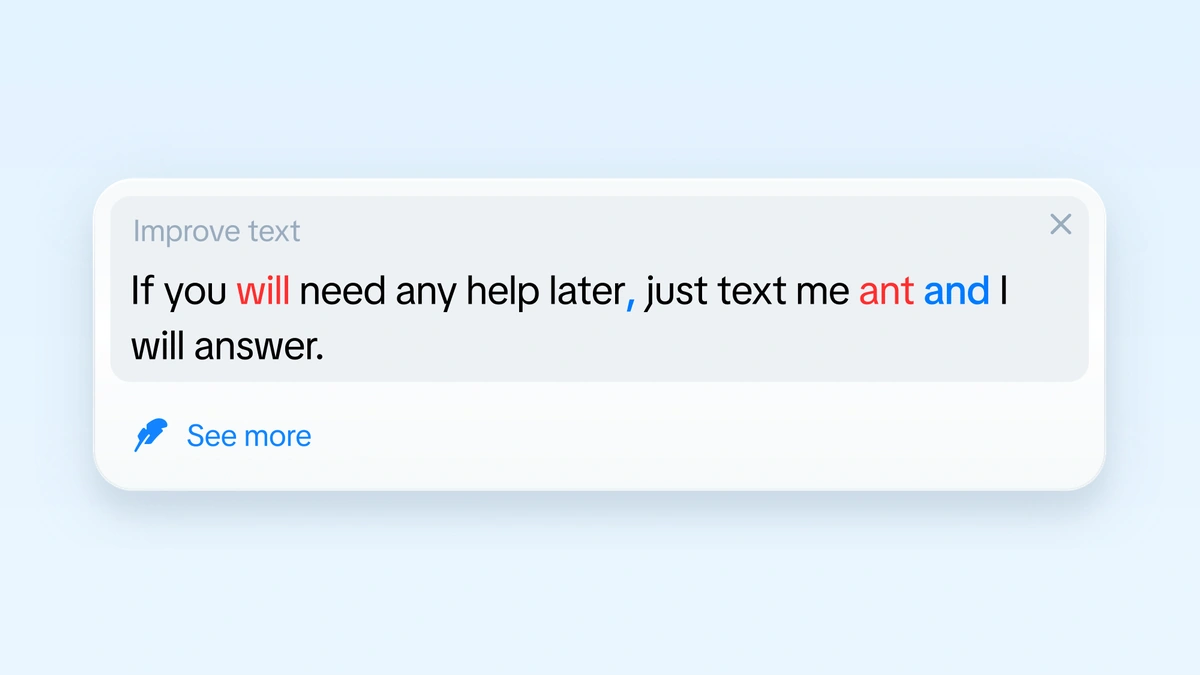
Here's what you can do where you're writing:
- Correct highlighted mistakes in the active document or email without copying text between tabs.
- Fix several grammar mistakes in a sentence with a single click in the tooltip, and see the reason for each suggestion.
- Rephrase a sentence with one command, using tone presets such as friendlier, firmer, or shorter.
- Pick the model for a rewrite: Auto, GPT, Claude, Gemini, DeepSeek, Grok, Kimi, or GLM.
- Use instant grammar corrections in English, pause the extension on a website, or disable it for an entire domain in settings.
- Rephrasing works in most widely spoken languages; instant grammar corrections are English only.
The Wordfully features page explains inline grammar corrections and tone adjustments across web platforms.
Frequently asked questions about ChatGPT as a grammar checker
Can I check grammar online with ChatGPT for free?
Yes. You can use ChatGPT's free plan for text proofreading. Features and limits can change; see OpenAI's Free Tier FAQ. This page provides prompts and examples, not an embedded checker.
Can ChatGPT spell check without rewriting my sentence?
Ask: "Correct spelling mistakes only. Leave all other wording unchanged." Check names and technical terms yourself, and reject unnecessary changes.
Can ChatGPT completely replace a dedicated grammar checker?
ChatGPT can analyze difficult sentences, but a dedicated checker is quicker for everyday corrections. It underlines errors on the page while keeping surrounding sentences and document formatting intact. With ChatGPT, you need to set limits in the prompt and review the output for unwanted changes.
Does ChatGPT work well for checking grammar in languages other than English?
ChatGPT can help review writing in many languages. Results vary by language and the kind of error. An evaluation of ChatGPT's grammatical error correction in three languages found potential in multilingual use while also identifying document-level errors that it did not correct effectively. Review suggestions with a fluent speaker or a trusted reference when the stakes are high.
Can ChatGPT explain the grammar rule behind a correction?
Yes. Ask why a particular edit was suggested. ChatGPT can explain rules in plain English, including squinting modifiers, split infinitives, and the subjunctive mood. That explanation can help you understand the correction instead of simply accepting it.