
What Is Proofreading? Definition and Practical Checklist

Proofreading is the final check before you publish, print, or send a piece of writing. You look for spelling mistakes, grammar slips, punctuation errors, inconsistent formatting, and missing words. By this stage, you have already finished revising the structure and editing the sentences.
Read the text in its finished layout and check the details. If you try to reorganize paragraphs or rethink the argument at the same time, it is easy to miss a typo. Give those larger changes their own editing pass before you start proofreading.
Proofreading vs. editing: understanding the editorial stages
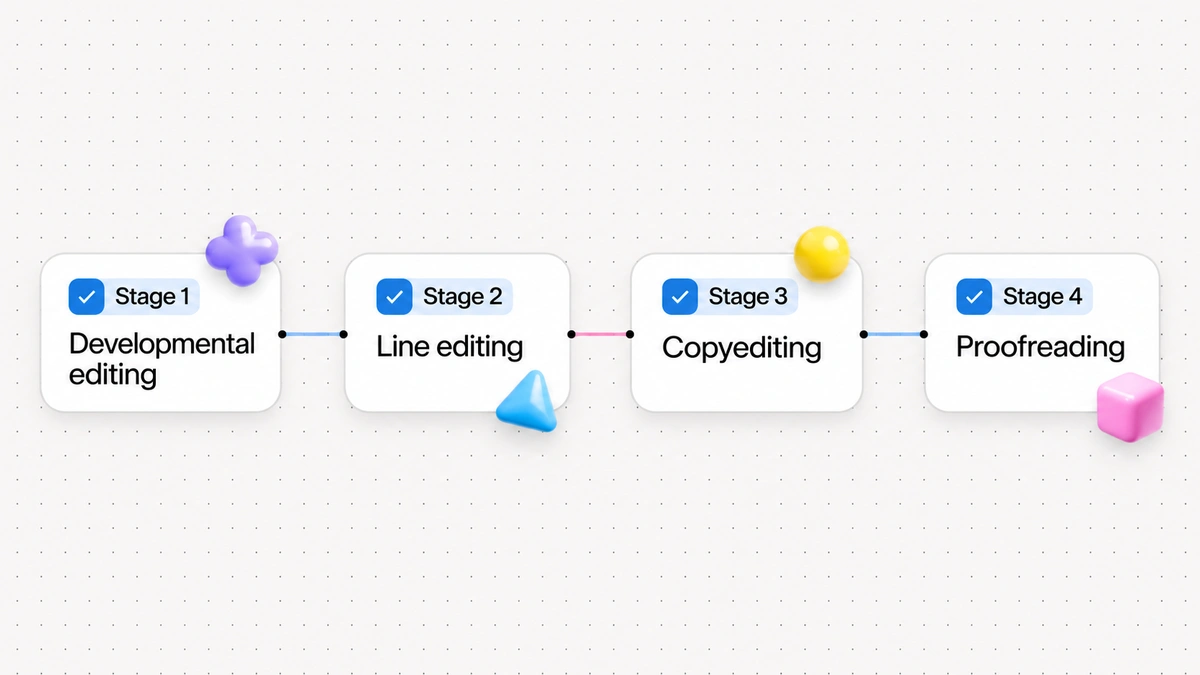
The Editorial Freelancers Association service definitions distinguish developmental editing, line editing, copyediting, and proofreading as separate services. Each stage addresses a different layer of the draft:
- Developmental editing deals with structure, content, and logic. The editor checks whether the argument makes sense, whether sections follow a sensible order, and whether anything essential is missing.
- Line editing improves individual sentences and paragraphs. The editor cuts wordy phrasing, works on rhythm and clarity, and helps the author's voice come through.
- Copyediting checks grammar, punctuation, usage, and style guide rules. The copyeditor also checks that names, terms, hyphenation, and citation formats stay consistent.
- Proofreading is the final check. In traditional publishing, a proofreader reviews proofs: formatted pages ready for press. In digital work, that means checking the finished document, slide deck, email, or blog post before it goes out.
Rescrito on the difference between correction and editing describes correction as fixing specific technical errors. Editing takes a wider view of the draft, including its clarity and tone.
| Editorial stage | Primary focus | Typical questions asked | What changes in the draft |
|---|---|---|---|
| Developmental editing | Structure, arguments, flow | Does this argument hold up? Are sections in the right order? | Paragraphs moved, added, or removed |
| Line editing | Style, voice, sentence rhythm | Is the language compelling? Are sentences clear and direct? | Phrasing smoothed, passive verbs replaced |
| Copyediting | Grammar, syntax, house style | Are terms spelled consistently? Do subjects match verbs? | Punctuation corrected, style rules enforced |
| Proofreading | Final errors, layout, typos | Are there stray spaces? Did any typo survive typesetting? | Surface errors fixed without rewriting |
As The Chicago Manual of Style Shop Talk discusses in its PDF proofreading guide, copyeditors usually make or suggest changes directly in the editable manuscript. Proofreaders work on the typeset text or final layout and mark the errors that remain.
What a proofreader checks: the core scope of work
The Chartered Institute of Editing and Proofreading guidance on what proofreading involves explains that proofreading covers both errors in the text and how corrections fit into the page layout. These are the details to check:
1. Spelling and typographical errors
Look for misspelled words, swapped letters, repeated words, and words that have gone missing. A spellchecker can miss a mistake when the wrong word is spelled correctly. It may let "statue" pass when you mean "statute," or "trail" when you mean "trial."
Pay attention to words that sound alike or nearly alike. Mixing up affect and effect, loose and lose, or principal and principle can make readers doubt your care with the rest of the text. Our guide to 20 commonly confused words has memory tricks to help you tell these pairs apart.
2. Punctuation consistency and correctness
Check that each sentence ends with the right punctuation and that every opening quotation mark or parenthesis has a matching closing mark. These small details affect how readers understand a sentence.
Check punctuation within sentences too:
- Apostrophes in possessives versus contractions (such as its versus it's).
- Comma placement, including commas after introductory clauses and checks for ambiguous run-ons.
- Hyphenation consistency in compound adjectives (for example, "full-time role" versus "employed full time").
- Consistent quotation marks, including curly rather than straight marks if your style guide requires them.
3. Grammatical agreement and syntax
Copyediting handles larger sentence problems, but agreement errors can survive into the final draft. Check:
- Subject-verb agreement, especially in long sentences with intervening prepositional phrases.
- Pronoun-antecedent agreement, so singular pronouns match singular nouns.
- Tense consistency across related narrative passages.
4. Layout, typography, and visual presentation
Text can pick up layout problems when you move it into an email template, slide deck, or content management system. Look at the page as well as the words. Check for:
- Bad line breaks where hyphens split short words awkwardly.
- Widows and orphans, where single lines or lonely words sit separated at the top or bottom of a column or page.
- Inconsistent heading styles, font weights, and type sizes across parallel sections.
- Double spaces between words or lingering extra line breaks between paragraphs.
5. Data accuracy, captions, and references
At this stage, checking facts means checking that the details agree within the document. If a heading says "Five Key Findings," count the items. There should be five, not four or six.
Also check that:
- Image captions match the image above or below them.
- Numbers in tables add up correctly and align with figures cited in body paragraphs.
- Footnotes, endnotes, and citations match their superscript numbers.
- Contact details and dates are correct, days of the week match the dates, and linked URLs work.
Check these details carefully if you have accepted suggestions from an automated rewriter. Our guide on how to check an AI rewrite explains how to compare dates, numbers, and facts with your original notes.
What proofreading is not: setting realistic boundaries
A disorganized first draft still needs editing. Proofreading does not include:
- Content creation or original drafting.
- Reorganizing the structure of a draft.
- Fact-checking the author's primary research or verifying lab experiments.
- Heavy stylistic rewriting to alter the author's voice.
- An open invitation to rewrite sentences because you had a new idea.
Changing a sentence in a finished layout can disturb the formatting, shift page breaks, or introduce a new typo. If you find a serious factual or logical problem, return to editing. Fix the problem there, then proofread the revised text.
A step-by-step practical proofreading checklist
Use this 7-step checklist for reports, emails, articles, and proposals. Work through it in order, with a separate pass for each kind of error.
Step 1: Step away to build cognitive distance
When you read a sentence you just wrote, you remember what you meant to say. That makes it easy to fill in a missing word mentally or read past a broken sentence.
For a routine email, take a five-minute break and get a glass of water. For a major proposal or article, leave it for a few hours or overnight. A break helps you read what is on the page with a little more distance.
Step 2: Change the visual format
A familiar font and layout can make mistakes easy to skim past. Change how you see the text to slow yourself down:
- Switch the font family or temporarily increase font size from 12 points to 16 points.
- Switch to reader mode or export the draft to a PDF viewer.
- Print the text and follow each line with a colored pen.
- Read the text aloud at conversational volume. Saying each word helps you hear missing prepositions, clumsy phrasing, and repeated words.
Step 3: Check formatting and visual hierarchy
On this pass, look at the layout without reading for meaning:
- Are all level-two and level-three headings styled with consistent capitalization, font sizes, and spacing?
- Are bulleted lists formatted identically, with matching punctuation at the end of each bullet?
- Do paragraph indents or spacing between blocks remain uniform throughout?
- Are there any accidental double spaces between sentences? You can use your software's find-and-replace feature to search for two spaces and replace them with one.
Step 4: Verify sentence mechanics and grammatical agreement
Read from beginning to end, checking grammar and punctuation:
- Identify the main subject and verb in each sentence to ensure they agree in number.
- Check introductory clauses for proper comma separation.
- Check every instance of "its" and "it's" or "their," "there," and "they're."
- Ensure that lists preceded by colons follow grammatical parallelism, with each bullet starting with the same part of speech.
Step 5: Isolate spelling and word choices
Try reading backwards, sentence by sentence or word by word, from the bottom of the page to the top. Following an argument can make you anticipate the next word and skip past a mistake. Reading in reverse breaks that flow so you can concentrate on spelling and punctuation.
Step 6: Verify numbers, dates, and live links
Give numbers and references a separate pass:
- Compare every statistic and dollar figure with your original spreadsheet or notes.
- Verify dates against a calendar, including whether a named weekday matches the full date and year.
- Click every hyperlink to confirm the destination page opens and returns valid content.
Step 7: Complete the final envelope check
Before you send or publish, check the details around the main text:
- In an email: verify recipient email addresses, CC lines, subject line, and attachments.
- In a document: check document title, author name, date, page headers, footers, and page numbers.
- In a web article: confirm the URL slug, meta description, and category.
Practical Before and After worked examples
Example 1: Routine project update email
Here is a draft update sent to a project team containing pronoun agreement errors, a confused homophone, a missing comma before a coordinating conjunction, a misspelled word, an apostrophe error in a contraction, and an ordinal date suffix.
Before: The team completed their review yesterday and sent there notes to the client but we have not recieved an acknowledgement yet. Its important that we follow up before October 12th.
After: The team completed its review yesterday and sent its notes to the client, but we have not received an acknowledgement yet. It's important that we follow up before October 12.
Why this edit works: The pronoun "their" was changed to "its" to keep the reference to the collective noun "team" singular. The homophone "there" was corrected to the singular possessive pronoun "its" to maintain consistent agreement with "team" for the notes. The misspelled "recieved" became "received." A comma was added before "but" because it connects two independent clauses. The possessive pronoun "Its" was corrected to the contraction "It's." The ordinal suffix was dropped to match the date style used here. No new claims or deadlines were added.
Example 2: Executive summary for a business proposal
This business excerpt contains a missing comma after an introductory phrase, a contraction used instead of a possessive pronoun, an improper capitalization, and a stray space before a period.
Before: Operating in three European markets the company expanded it's logistics network significantly during Q3. Several new Warehouses were opened, which reduced average delivery times by 14 percent .
After: Operating in three European markets, the company expanded its logistics network significantly during Q3. Several new warehouses were opened, which reduced average delivery times by 14 percent.
Why this edit works: A comma was added after the introductory participial phrase "Operating in three European markets" to provide a necessary pause for reader comprehension. The contraction "it's" was corrected to the possessive pronoun "its." The common noun "warehouses" was lowercased because it is not a proper noun. The stray space preceding the terminal period was deleted. The factual numbers and percentages remained identical.
Example 3: Academic paper conclusion paragraph
Here is a passage with subject-verb agreement errors, a missing closing parenthesis, and a missing comma after a transitional adverb.
Before: A careful evaluation of the survey results indicate that participant satisfaction increased across all demographics (see Table 4. However the researchers note that further studies is required to confirm these trends.
After: A careful evaluation of the survey results indicates that participant satisfaction increased across all demographics (see Table 4). However, the researchers note that further studies are required to confirm these trends.
Why this edit works: The verb "indicate" was changed to the singular "indicates" because the singular head noun of the subject is "evaluation," not the plural object of the preposition "results." The missing closing parenthesis after "Table 4" was restored. A comma was placed after the transitional adverb "However." The verb "is" was adjusted to the plural "are" to agree with the plural subject "studies."
Example 4: Technical documentation notice
This notification draft contains a confused homophone, an unnecessary comma before an infinitive phrase, a missing possessive apostrophe, and a missing comma after an introductory conditional clause.
Before: Users must log in with there company credentials, to access the secure database. If an employees account becomes locked please contact the IT help desk immediately.
After: Users must log in with their company credentials to access the secure database. If an employee's account becomes locked, please contact the IT help desk immediately.
Why this edit works: The adverb "there" was replaced with the possessive pronoun "their." The unnecessary comma separating the verb phrase from the infinitive clause of purpose was removed. The missing possessive apostrophe in "employee's" was inserted. A comma was added after the conditional introductory clause ending in "locked" to separate it from the main directive clause.
Three common proofreading mistakes to avoid
1. Proofreading while you draft
Stopping mid-sentence to fix a comma or debate a spelling can make you lose your train of thought. Drafting means working out what you want to say; proofreading means examining what is already there. Write first, edit the structure next, and leave the final checks until the text is settled.
2. Overlooking title pages, headings, and metadata
It is easy to spend all your effort on body paragraphs and overlook the largest type on the page. Headlines, cover pages, and email subject lines can contain typos too. Check them yourself instead of assuming someone else has done it.

3. Introducing new errors during last-minute fixes
Every last-minute change needs a fresh check. After you fix a phrase, reread the whole sentence and the sentences on either side. The correction may have introduced an error you have not seen yet.
Using writing assistance tools to speed up proofreading
Browser-based writing tools can catch mechanical mistakes as you draft and save time during review. You still need to check the finished text yourself.
Digital.gov's plain language guide recommends testing whether readers can understand a document. That is a separate check from catching its surface errors. Automated tools can help flag grammar and spelling issues as you type.
Wordfully checks English grammar as you type in Gmail, Google Docs, Slack, Notion, and LinkedIn, and rewrites unclear sentences in one click. Suggestions appear alongside your writing, so you can review them without copying the text into another editor.
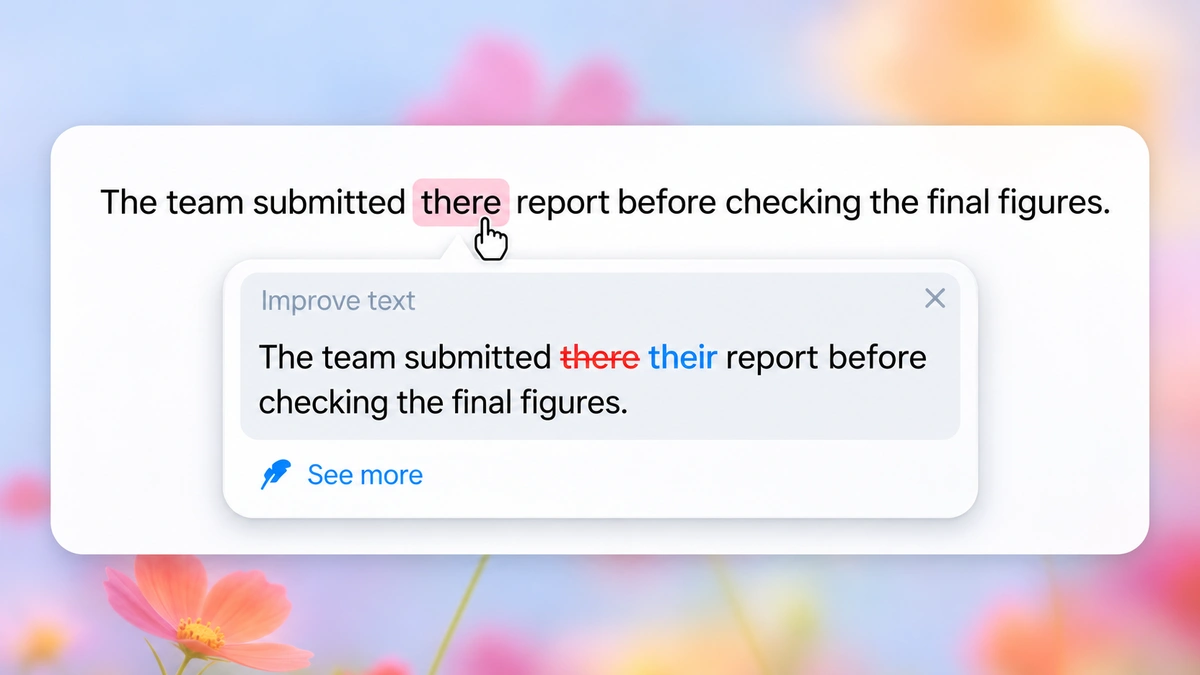
The features page and our overview of the Wordfully AI writing assistant extension explain how these tools work in your browser. Use the suggestions during drafting, then work through the checklist before you send.
Frequently asked questions about proofreading
How much time should you budget for proofreading?
For straightforward text, the Chartered Institute of Editing and Proofreading gives 2,000 to 3,000 words per hour as a professional rule of thumb. Allow longer for dense technical material or documents with equations, citations, or complex layout. Set aside a separate block of time after editing for the final pass.
What is proof-editing?
Proof-editing combines parts of copyediting and proofreading in a single pass. It is common in corporate work, self-publishing, and digital marketing when deadlines leave too little time for separate rounds with different editors.
What is a style sheet, and how does it help during proofreading?
A style sheet is a running record of specific editorial choices established for a project. It documents preferred spellings, hyphenation rules for compound words, capitalization patterns for titles, and standard formats for dates and numbers. Referring to a style sheet helps a proofreader maintain strict consistency throughout a document, especially when multiple writers contribute content.