
How to Write a Polite Reminder Email That Gets Results

To write a polite reminder email, put your request in the first two sentences, include the original context or reference date, and give the reader one easy next step. You can be direct without sounding impatient. Name the project, invoice, or meeting in the subject line so they don't have to search their inbox to work out what you need.
It's easy to put off a reminder because you don't want to seem pushy or rude. But inboxes fill up, and a busy colleague may appreciate a check-in that brings a task back to their attention. A short note with enough detail to answer makes following up feel like a normal part of working together.
The five essential parts of a polite reminder email
A useful reminder tells the reader what you're asking about and what to do next. These five parts help you cover both without making them piece the request together.
1. A descriptive subject line
The subject line can affect whether someone opens your message now, saves it for later, or skips it. If you're following up on an existing conversation, reply in the same thread. That lets the reader look back at the earlier messages for context.
For a new thread about an invoice or appointment, name the topic and the action you need. "Checking in," "Follow up," and "Quick question" tell the reader very little. Try a subject line like these:
- Invoice 1042 due on November 20: payment reminder
- Design assets review for website launch: follow-up
- Reminder: Project kickoff meeting tomorrow at 10 AM EST
- Status check: vendor agreement draft for Q1
The Purdue Online Writing Lab guide on email etiquette recommends specific subject lines to give readers context and help them decide which messages to handle first.
2. A professional and warm greeting
Choose a greeting that fits your relationship. "Hi [Name]" or "Hello [Name]" works for most business emails. "Dear [Name]" suits a more formal relationship, a prospective client, or someone in executive leadership.
You don't need to apologize for a routine request. Opening with "I am so sorry to bother you again" or "I hate to be a pest" can make you sound unsure and make the exchange feel more awkward than it needs to be.
3. Immediate context in the opening sentence
Mention the original date, topic, or document in your opening sentence. The reader shouldn't have to search old emails to understand your request:
- Following up on the proposal sent on Tuesday, November 10.
- Checking on the status of invoice 1042 sent on October 31.
- Writing to confirm our strategy call scheduled for tomorrow afternoon.
That reference helps the reader remember the earlier exchange and see what needs their attention.
4. A single and low-friction call to action
Ask for one specific outcome. An email that asks several questions, requests documents, and invites the reader to brainstorm takes more effort to answer. They may leave the whole thing until later.
Make the response as simple as possible:
- Could you confirm whether the proposed budget works for your team?
- Please let me know if you need an updated payment link.
- Are you still available to meet tomorrow at 2 PM, or would Thursday morning suit you better?
A closed question or a choice between two options usually gets a faster answer than a broad "What do you think?"
5. A polite sign-off with clear contact details
Use a sign-off such as "Best regards," "Sincerely," or "Best," then add your name, role, and organization. For an urgent or time-sensitive request, include your direct phone number so the reader has another way to reach you.
When to send a reminder email: timing and cadence
Follow up too soon and you risk frustrating the reader. Wait too long and a project or payment can slip. Base the timing on what you're asking for, how close the deadline is, and your relationship with the recipient.
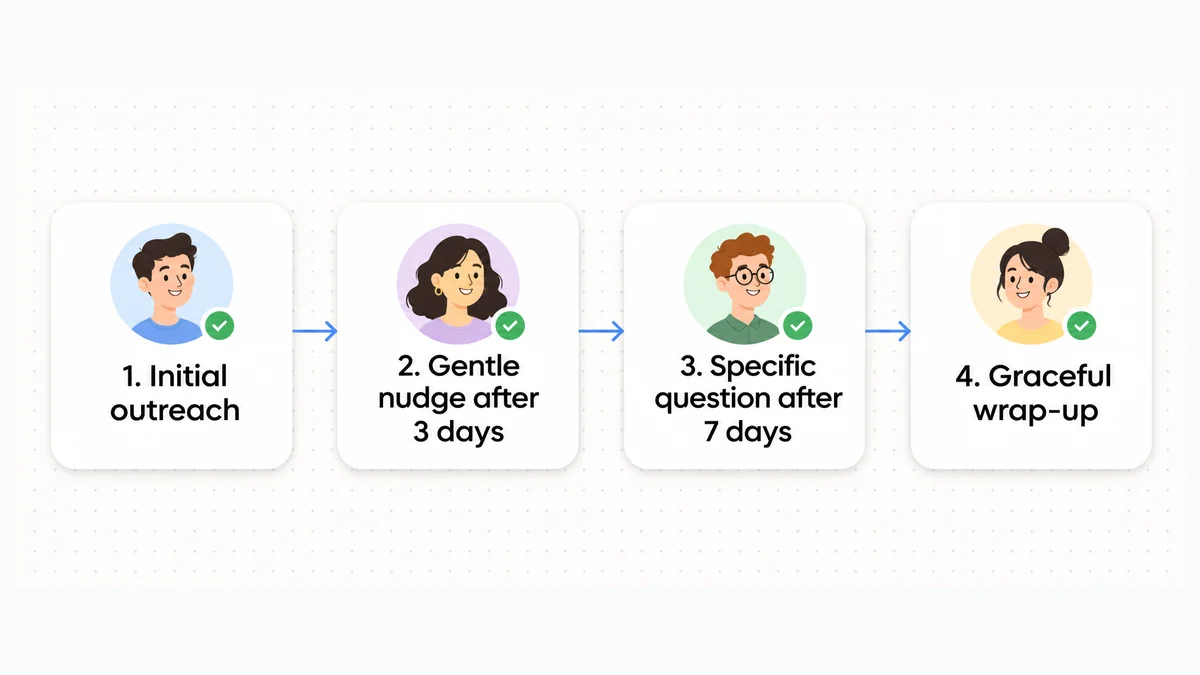
Use these timing windows as a guide for common work situations:
| Situation | First reminder | Second reminder | Final reminder |
|---|---|---|---|
| Unanswered business inquiry | 3 to 5 business days | 5 to 7 business days later | 10 to 14 business days later |
| Overdue invoice or payment | 1 business day after due date | 7 calendar days overdue | 14 to 30 calendar days overdue |
| Upcoming meeting or appointment | 24 to 48 hours before | Morning of meeting | Not applicable |
| Approaching task deadline | 2 to 3 days before due date | Day after missed deadline | 3 business days later |
Spacing reminders by business days
Count the gaps between follow-ups in business days rather than calendar hours. If you send a message late on Thursday, Monday morning is too soon to chase it: the reader has had only a single business day to respond.
The UNC Chapel Hill Writing Center guidelines on email communication note that many people answer email only during regular business hours and suggest assuming a reply may take a few days. Give them that time before following up.
Changing the angle across messages
If the first email went unanswered, sending the same message again rarely helps. Prestimonia's article on follow-up email sequences and timing recommends changing the approach in later messages. You might share a useful resource, suggest a shorter meeting, or ask a simpler question that helps you decide whether to continue the conversation.
Psychological framing and positive intent
Silence can feel personal, especially when you're waiting on a decision. Usually, though, a missed reply comes down to a busy schedule, travel, another deadline, or an overlooked message.
Executive coach Rebecca Zucker advises assuming positive intent in Harvard Business Review on following up. Avoid accusations. Explain the shared goal and give the person a way to respond without having to defend the delay.

Before and After edit examples
These four examples show how small cuts can make a reminder clearer. Each removes filler, an apology, or wording that can sound irritated.
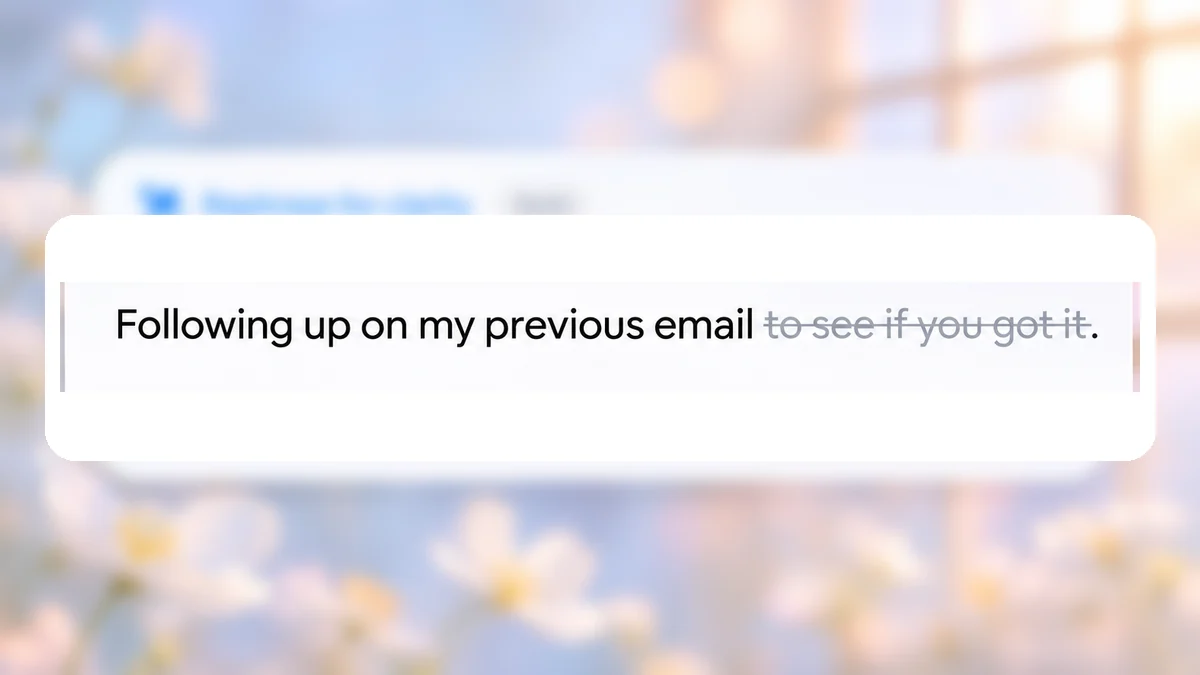
Example 1: Cutting filler from a routine check-in
Before: Just following up on my previous email to see if you got it.
After: Following up on my previous email.
Why this edit works: The phrase "to see if you got it" adds unnecessary words because email delivery is rarely in doubt. Removing those words leaves a concise, polite sentence that states your purpose without sounding uncertain. It introduces no new facts, names, or deadlines.
Example 2: Removing passive-aggressive phrasing from a follow-up
Before: Per my last email, please confirm whether the signed contract is ready.
After: Please confirm whether the signed contract is ready.
Why this edit works: The phrase "Per my last email" often sounds irritable or confrontational to readers. Cutting the phrase keeps the direct request intact while maintaining a respectful tone. No new information, deadlines, or details are added.
Example 3: Removing excessive apologies from an invoice reminder
Before: I am terribly sorry to bother you, but could you please check on invoice 1042?
After: Could you please check on invoice 1042?
Why this edit works: Apologizing for a routine accounting inquiry undermines your professional position and makes the note longer. Dropping "I am terribly sorry to bother you, but" creates a polite, matter-of-fact inquiry about invoice 1042 without altering any facts.
Example 4: Streamlining an upcoming meeting confirmation
Before: I just wanted to reach out quickly to confirm our planning session tomorrow at 2 PM.
After: Confirming our planning session tomorrow at 2 PM.
Why this edit works: Phrases like "I just wanted to reach out quickly to" delay the core message. Removing the conversational throat-clearing keeps the focus on the planning session tomorrow at 2 PM.
Copy-ready reminder email templates from gentle to firm
Use these templates as starting points for common workplace situations. Replace the bracketed text with your specific details.
Scenario 1: Missed replies and unanswered messages
For an unanswered message or proposal, start with a gentle reminder. Be more direct in the next message, then close the thread politely if you still don't hear back.
Template 1: Gentle initial nudge (3 to 5 business days after initial outreach)
Subject: Re: [Original Subject Line]
Hi [Name],
I'm following up on the email I sent on [Date] about [Topic or Deliverable].
Have you had a chance to review the details? Please let me know if you need any more information from me.
Best regards,
[Your Name]
Template 2: Direct reminder with a clear decision point (7 to 10 days later)
Subject: Following up: [Topic or Proposal Name]
Hi [Name],
I'm checking in about our conversation on [Topic or Deliverable].
We're planning next month's schedule. Is moving forward with [Project or Proposal] still a priority for your team?
A quick yes or no will help us adjust our schedule.
Best regards,
[Your Name]
Template 3: Polite closing or break-up email (releasing the thread gracefully)
Subject: Closing the loop on [Topic or Proposal Name]
Hi [Name],
Since I haven't heard back about [Topic or Deliverable], I assume your priorities have shifted for now.
I'll close this file on our end so you won't receive more follow-ups. If you want to revisit the project, please get in touch when the timing works for you.
Thank you for your time,
[Your Name]
Scenario 2: Overdue invoices and payment reminders
Payment reminders need to be firm without souring the client relationship. Send them promptly and make it clear which invoice needs attention.
Template 4: Friendly advance reminder (3 to 5 days before payment due date)
Subject: Courtesy reminder: invoice [Invoice Number] due on [Due Date]
Hi [Name],
A reminder that invoice [Invoice Number] for [Amount] is due on [Due Date].
I've attached the invoice. Please confirm you've received it and let me know if your finance department needs any other billing details to pay on time.
Thank you for your partnership,
[Your Name]
Template 5: Courteous reminder on the due date
Subject: Invoice [Invoice Number] due today: [Company Name]
Hi [Name],
Could you confirm the payment status for invoice [Invoice Number]? The amount of [Amount] is due today, [Due Date].
If payment is already on its way, please disregard this notice. Otherwise, please let me know when we can expect the funds to clear.
Best regards,
[Your Name]
Template 6: Firm overdue payment notice (7 to 14 days overdue)
Subject: Overdue notice: invoice [Invoice Number] ([Amount])
Hi [Name],
We haven't received payment for invoice [Invoice Number] for [Amount], due on [Due Date]. It is now [Number] days overdue.
Please check with your accounts payable team today and confirm the scheduled payment date. I've attached the original invoice.
If there's a billing discrepancy or a technical problem with the transfer, please let me know right away so we can help resolve it.
Sincerely,
[Your Name]
Template 7: Final formal payment notice
Before sending a final notice, check the agreed payment terms and what action your organization is authorized to take. Laws and contract terms vary by location. For example, the UK government explains when statutory interest and debt recovery may apply to late business payments. If you plan to charge interest, suspend service, or start formal collection, get the wording reviewed for your situation.
Subject: Urgent: final notice for overdue invoice [Invoice Number]
Dear [Name],
This is our final reminder about unpaid invoice [Invoice Number] for [Amount]. It was due on [Due Date] and is now [Number] days overdue.
Despite our previous reminders on [Date 1] and [Date 2], this balance remains unpaid.
Please send the full payment of [Amount] by [Final Deadline Date], or let us know by then if you dispute the invoice or need a copy. If we do not hear from you, we will review the next steps available under our agreement.
Please reply with the payment date or call me at [Phone Number] so we can resolve this promptly.
Sincerely,
[Your Name]
Scenario 3: Upcoming meetings and appointment confirmations
A brief confirmation can substantially reduce missed meetings and help everyone arrive prepared.
Template 8: Advance meeting confirmation (24 to 48 hours before)
Subject: Confirming our meeting on [Date] at [Time]
Hi [Name],
I'm looking forward to discussing [Topic] on [Date] at [Time].
Here is the video link for our call: [Meeting Link].
Please review the attached agenda before the call. Let me know if you'd like to add any topics, and I'll include them in our schedule.
Best regards,
[Your Name]
Template 9: Day-of logistics reminder (morning of meeting)
Subject: Quick reminder: our call today at [Time]
Hi [Name],
Confirming our meeting today at [Time] to review [Topic].
Join the call here: [Meeting Link].
Looking forward to speaking with you shortly.
Best,
[Your Name]
Template 10: Polite follow-up after a missed meeting
Subject: Re: our missed call today at [Time]
Hi [Name],
I'm sorry we missed each other for our call today at [Time]. I hope everything is fine on your end.
What day and time next week would work for you to reschedule? You can also choose a slot on my calendar here: [Calendar Link].
Best regards,
[Your Name]
Scenario 4: Project milestones and approaching deadlines
Check in before a deadline so you can address delays before they hold up the next stage of work.
Template 11: Pre-deadline milestone check (2 to 3 days before due date)
Subject: Checkpoint: [Deliverable Name] due on [Due Date]
Hi [Name],
I'm checking on [Deliverable Name], due on [Due Date].
Are you still on track to finish your draft by then? If you're having technical problems or need input from colleagues, please let me know so we can help.
Best regards,
[Your Name]
If you need a progress report on active work, our guide on how to ask for a status update covers that kind of request.
Template 12: Firm post-deadline adjustment request
Subject: Update needed: missed deadline for [Deliverable Name]
Hi [Name],
I'm following up on [Deliverable Name], which was due yesterday, [Due Date].
The next phase of our project depends on this work, so we need the completed deliverable to stay on schedule. Please send your current draft or a revised completion time by the end of today.
If an unexpected problem is holding this up, please let me know so we can adjust our milestones.
Best regards,
[Your Name]
Five common mistakes that ruin a reminder email
Even a short reminder can irritate the reader if the wording sounds impatient. Check for these five mistakes before you send it.
1. Relying on passive-aggressive clichés
"Per my last email," "As stated below," "Re-attaching for your convenience," and "Just bumping this" can sound frustrated or condescending, even if you didn't mean them that way. Restate the fact or question instead of drawing attention to the missed message.
2. Using vague or misleading subject lines
"Hey" or "Important" makes the reader guess what's inside. Changing the subject on every follow-up can also split the conversation across separate threads. A clear, consistent subject lets them see the history in one place.
3. Bundling multiple unrelated requests together
An invoice sign-off, slide deck feedback, and workshop scheduling each need a separate decision. Put them in one email and the reader may wait until they have time for all of them. Keep a reminder to one topic and one next step.
4. Escalating across multiple communication channels too quickly
An email at 9:00 AM, a Slack message at 9:30 AM, and a phone call at 10:00 AM can make a routine request feel like a crisis. Unless there's a severe system outage or legal emergency, give the reader reasonable business hours to answer before trying a real-time channel.
5. Demanding explanations instead of offering solutions
"Why has this not been paid yet?" or "Why did you not respond?" asks the reader to defend themselves. "Please confirm whether this invoice has been scheduled for payment" or "Let me know if you need any clarification" keeps the conversation focused on resolving the issue.
Polishing your reminder emails before sending
Read the draft once more before sending it. Typos, broken links, and incorrect details can undermine your credibility and delay the reply you need.
Catching confusing word choices
Check words that a spellchecker might miss. "Principal" and "principle," or "ensure" and "insure," can both look right at a glance. Our guide to commonly confused words can help you check which one belongs in your sentence.
Performing a systematic proofreading pass
Compare dates, dollar amounts, invoice numbers, and recipient names with your records. Proofreading is your last check before sending or publishing. Our guide on what is proofreading gives you a step-by-step way to catch missing details and formatting errors.
Checking automated and AI rewrites
If you use an AI writing tool, compare its suggestion with your draft. It should keep your exact deadlines, factual details, and intended tone. Tools can add claims you didn't make or lose a qualification that matters. Use our checklist on how to check an AI rewrite to review the result.
Adjusting tone directly in your browser with Wordfully
Getting the tone right can take a few tries, especially when you need to be firm about a late payment. Wordfully is a Chrome extension that checks grammar and suggests rephrasing and tone adjustments in Gmail, Google Docs, Slack, Notion, and LinkedIn. You can edit where you're typing without copying the draft into another window.
Wordfully's one-click suggestions can help you make a payment reminder sound professional or shorten a long check-in. The AI writing assistant extension guide and Wordfully tone features explain how those edits work.
Frequently asked questions about reminder emails
How many reminder emails should you send before stopping?
For routine business inquiries and sales proposals, two to three reminders over two to three weeks are generally enough. Start gently, ask directly in the next message, and close the thread politely if there's still no reply. Further messages are less likely to help and may damage your professional reputation. Overdue invoices may need three to four notices before formal debt collection procedures.
What should you do if an overdue invoice reminder is ignored?
If email reminders go unanswered, contact the client's accounts payable department. Check that they received the invoice and sent it to the right approver. If the balance remains unpaid, follow your agreed payment terms and your organization's collection process. Verify any fees or formal notice requirements before including them in a letter.
Is it acceptable to use the phrase "friendly reminder"?
"Friendly reminder" is common in work emails, but readers can find it insincere or passive-aggressive. A respectful greeting and a brief, helpful request usually do more to make the message feel friendly. You don't need to label it.
Should you always reply in the original email thread?
Usually, yes. Keeping project updates, feedback requests, and general follow-ups in the original thread preserves the history. Start a new thread if the old one has become hard to follow, or if a formal accounting notice or invoice reminder needs its own record. Give the new email a descriptive subject line.
How do you politely remind someone who outranks you?
Keep it brief and explain how the request fits their schedule or priorities. Name the decision or approval you need, include enough background to save them looking it up, and say which next step depends on their answer. Leave blame out of the message and offer to answer questions.